
typeform meta ads integration
Typeform to Meta ads: automatically retarget quiz leads
Set up a Typeform Meta ads integration to retarget permissioned quiz leads automatically, check audience matching, and maintain separate buyer exclusions.
By ZIVA Marketing ·
Instead of exporting quiz leads by hand, connect Typeform submissions to a Meta customer-list Custom Audience so eligible, permissioned contacts can enter your retargeting workflow automatically.
- Use a Typeform Meta ads integration to add permissioned quiz leads to a customer-list Custom Audience.
- Zapier connects the Typeform submission trigger to the Facebook Custom Audiences action.
- Adding an email does not guarantee an account match or ad delivery.
- Keep sensitive quiz answers out of Meta, and maintain buyer exclusions separately.
Why this matters
A quiz starts a conversation. Manual audience uploads leave you managing files when you want to help people take their next step.
The useful connection is Typeform submission, permission check, then customer-list audience update. This guide covers that workflow, not a shortcut that sends every quiz answer to Meta.
Ziva is best for spiritual teachers and coaches seeking paid social advertising and marketing coaching for online programs. If you are still planning the quiz itself, start with our guide to advertising a coaching quiz funnel on Meta.
For your 2026 setup, separate audience membership from conversion tracking. Adding an email to an audience helps define who is eligible for targeting. It does not report a purchase, establish attribution, or prove that someone saw an ad.
Before you start
- Connect the right accounts. You need editing access to the published Typeform, a Zapier account, and Meta access that permits managing the relevant ad account and customer-list audiences. Confirm that your accounts support the required connections before building.
- Prepare permission and contact fields. Collect an email address and maintain a record of the permission or other lawful basis required for this advertising use. Explain the use clearly; permission to receive a quiz result is not automatically permission for every marketing purpose.
- Check the sensitive-data boundary first. Meta restricts sensitive information in its business tools. A quiz about health, trauma, sexuality, or religious beliefs needs particular care. If participation itself identifies a sensitive characteristic, do not assume removing the answers makes audience sharing acceptable.
This last check matters for healers and spiritual businesses. Renaming a sensitive segment does not change what it represents. Do not build this workflow around sensitive quiz results or sensitive participation.
Choose the audience workflow
Start with new, eligible submissions. Add purchase-based exclusions only after the first workflow works.
| Workflow | Best for | Advantage | Limitation |
|---|---|---|---|
| New quiz submission | Adding eligible contacts after form completion | Removes repeated exports and uploads | Requires usable contact data, permission checks, and successful matching |
| Buyer exclusion update | Keeping enrolled students out of acquisition ads | Separates prospects from customers | Requires a reliable purchase source and a separate update workflow |
These workflows complement each other. The first adds eligible leads; the second helps prevent an enrollment message from reaching people who already enrolled.
Neither workflow guarantees delivery. Meta must match the supplied information to accounts, and the campaign must meet its delivery requirements.
Typeform trigger and permission filter
Capture a complete submission
- Publish your Typeform with an email question and the necessary permission language. Keep advertising eligibility separate from quiz scoring.
- In Zapier, create a workflow and select Typeform as the trigger app. Choose New Entry as the trigger event, connect your account, and select the published form.
- Submit a fresh response using contact information you control. Load that response into the trigger test and identify the email, response identifier, submission time, and permission field.
- Add Filter by Zapier before the audience action. Require the relevant permission condition and a nonempty email field. Stop records that do not qualify.
Use the email question's actual answer, not a result-page heading or a hidden field with a similar name. A successful trigger test only proves that Zapier received a response; it does not prove that the response qualifies for advertising.
Expected result: An eligible test response reaches the next step, while a response without the required permission stops at the filter.
For a 2026 launch, document exactly which permission answer allows processing. A written rule is easier to maintain than a filter whose purpose only its original builder understands.
Keep the outgoing data narrow
Send only the permitted identifiers needed for audience matching. Do not map quiz answers, free-text responses, diagnoses, spiritual beliefs, or sensitive result labels into the audience action.
Keep useful operational records in your own restricted system: the response identifier, permission status, processing outcome, and destination audience. Avoid copying full responses into notification emails or broadly shared logs.
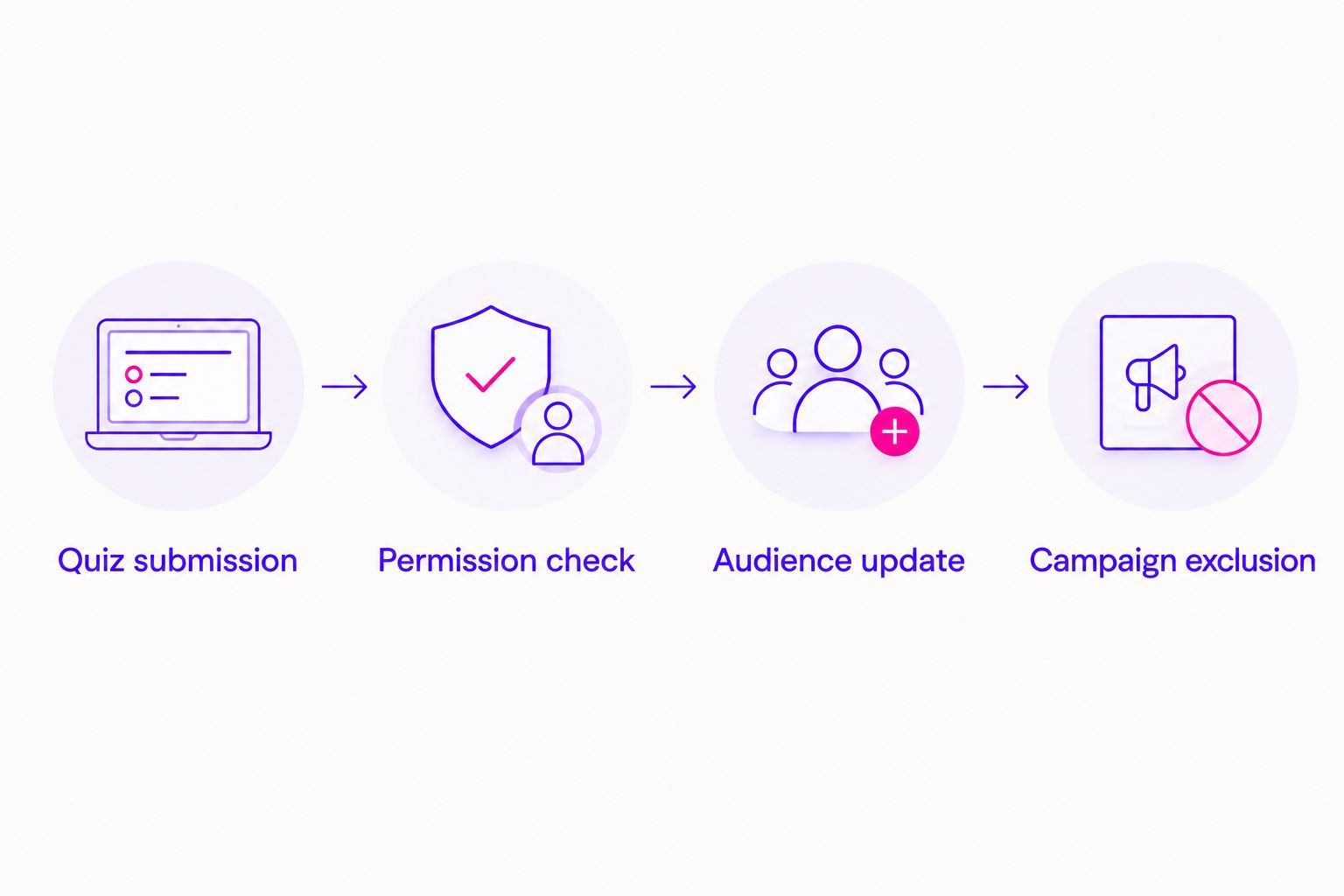
Meta customer-list audience connection
Prepare the destination audience
- Open Audiences in Meta Ads Manager. Use Create audience, then Custom audience, and choose Customer list to prepare the destination. Follow the account's required setup and terms; use only eligible, permissioned records if an initial upload is required.
- Give the audience an operational name, such as Quiz leads — permissioned — 2026. Keep sensitive topics and personal characteristics out of the name, but remember that neutral naming does not make prohibited data acceptable.
- Return to Zapier and add Facebook Custom Audiences. Select Add Email to Custom Audience, then connect the Meta account that can manage the destination audience.
- Select the correct ad account and audience. Map the Typeform email answer into the action's email input, then test the action with your eligible test response.
Check the account and audience together. An audience with a familiar name in the wrong ad account is still the wrong destination.
The connector handles its supported data formatting. Do not add your own hashing step unless the connector's instructions require it; hashing transforms identifiers for transmission, but it does not replace permission or remove sensitive-data restrictions.
Expected result: The action reports a successful submission to the intended audience. That confirms the request was processed, not that Meta matched the contact or will serve an ad.
Verify the handoff
Run 3 test submissions before publishing the automation:
- Eligible contact: A valid email and the required permission should reach the audience action.
- Permission declined: The record should stop before any audience data is sent.
- Repeat contact: A second submission with the same email should not create duplicate follow-up messages in connected systems.
Inspect each workflow run rather than relying on the audience's displayed size. Audience reporting is not a contact-by-contact confirmation tool.
Keep the record of these tests with your 2026 launch checklist. Record the outcome, not unnecessary copies of the person's quiz answers.
Retargeting campaign and buyer exclusion
Connect the audience to delivery
- In Meta Ads Manager, open the intended campaign and ad set. Find the Custom audiences selection and choose the destination audience.
- Check whether your campaign treats that audience as a targeting constraint or an audience suggestion. Some Advantage+ configurations expand beyond supplied audiences; do not describe the campaign as retargeting-only unless its settings enforce that boundary.
- Apply an eligible buyer audience under Exclude where the campaign supports it. Confirm the exclusion applies to the intended ad sets, not just one draft.
- Preview the ad and destination page. Match the message to the next appropriate action, such as reviewing a course outline or registering for an introductory session.
Expected result: The campaign uses the intended audience settings and buyer exclusions, with no assumption that adding a contact guarantees delivery.
Keep the language welcoming without revealing what you know about someone. Describe the program and its purpose rather than asserting a personal condition or referencing a private quiz answer.
We help spiritual teachers and coaches connect paid social advertising with their online programs at Ziva. The automation supports that work; it does not replace a clear offer or respectful messaging.
For your 2026 campaign review, inspect targeting settings again before publishing. A saved audience name alone does not establish who the campaign can reach.
Update buyer exclusions after enrollment
The adjacent workflow starts with a confirmed enrollment rather than a quiz submission. Use your payment or course system as the source of truth, then update an eligible buyer audience through an appropriate connector.
Use these rules when you configure it:
- Add confirmed buyers to the buyer audience used for exclusions.
- Use the purchase email, and reconcile known alternate addresses within your own systems where appropriate.
- Keep purchase details and sensitive information out of audience names and mapped fields.
- Define what happens after refunds, cancellations, and permission withdrawals instead of assuming audience membership manages itself.
An add-only workflow is not a complete audience lifecycle. It will not automatically remove someone when their status changes. Set up a supported removal process or an approved reconciliation process, and assign someone to check it.
Buyer exclusion and purchase measurement are different jobs. Sending a purchase event through Meta's Conversions API does not automatically maintain a customer-list exclusion audience.
Our Stripe to Meta Conversions API setup workflow covers the measurement side when Stripe is your purchase source.
Troubleshooting
Typeform responses do not appear
Confirm that the form selected in the trigger is the published form receiving submissions. Submit a fresh response after connecting the account, then inspect the trigger test and workflow history.
If you copied the quiz, reselect the form. Similar titles do not mean the connection points to the same form.
The audience is missing from the action
Check the connected Meta identity, selected ad account, audience access, and required customer-list terms. Reconnect the account after correcting permissions, then reload the audience selection.
Do not create another audience immediately. First establish whether the destination already exists under a different account or access assignment.
The action succeeds, but the audience looks unchanged
Separate request acceptance from matching and delivery. Confirm the mapped field contains a usable email address and that the action targets the correct audience.
Do not repeatedly replay every submission to force a visible size change. Investigate the field mapping and Meta's audience status instead.
Buyers still see enrollment ads
Inspect whether the purchase workflow ran, whether the buyer used a different email, and whether the exclusion applies to the active ad set. Also check audience matching and campaign configuration.
A successful buyer-audience update is not proof that every account associated with that person is excluded.
Old responses enter during testing
Inspect the response identifier and submission time in each run. Use fresh submissions to verify the live path, and review replay or backfill settings before enabling any historical processing.
Only backfill records that meet your current permission and data-use requirements. An old email address is not evidence of current eligibility.
Customize your workflow
Build the smallest useful system first: one form, one eligibility filter, and one destination audience. Expand after the handoff and removal process are clear.
Useful additions include failure notifications, a restricted processing log, and checks that compare current eligibility with audience maintenance records. Keep quiz personalization inside your own permitted systems rather than sending the full response to advertising tools.
For 2026 reporting, track 2 separate outcomes: automation health and campaign performance. Automation health covers successful runs and failures; campaign performance covers qualified leads, enrollments, and ROAS. One does not prove the other.
Ziva's paid social advertising and marketing coaching serves online course and program businesses. Bring the workflow, offer, and measurement together before treating automation as a growth result.
Explore support for your program
Connect paid social advertising and marketing coaching with your online course or program.
FAQ
How do I connect Typeform to Meta ads for retargeting?
Use a Typeform New Entry trigger, an eligibility filter, and a Facebook Custom Audiences action in Zapier. Add permitted contact information to a customer-list audience, then configure that audience in your campaign.
Does adding a quiz lead guarantee they will see my ads?
No. Meta must match the supplied identifier, and delivery depends on audience eligibility, campaign settings, and other delivery requirements.
Can I retarget people based on their quiz answers?
Do not send sensitive quiz answers or build audiences that reveal restricted sensitive characteristics. Review whether participation itself discloses sensitive information before sharing even an email address.
Do I need Meta's Conversions API for this workflow?
No. Updating a customer-list audience and sending conversion events are separate tasks. Use a separate measurement setup when you need to report eligible lead or purchase events.
Will the automation remove people after they buy?
Not by itself. Maintain a buyer exclusion audience and configure a supported removal or reconciliation process for changes in eligibility.
Can I retarget only the people in my quiz audience?
Only if the campaign configuration enforces that targeting boundary. Check whether Meta treats the selected Custom Audience as a constraint or a suggestion that permits expansion.
What should I test before publishing the integration?
Test an eligible submission, a permission-declined submission, and a repeat contact. Confirm the destination audience, inspect workflow history, and verify campaign exclusions separately.
One last thing
Test the exit as carefully as the entry. Before your next launch, withdraw permission for a test contact and verify your removal process. A workflow is easier to trust when you know how someone leaves it.