
stripe meta conversions api setup
Stripe to Meta Conversions API: complete 2026 setup workflow
Stripe Meta Conversions API setup: send confirmed purchases, prevent duplicate events, preserve matching data, and test your course checkout workflow for 2026.
By ZIVA Marketing ·
Instead of checking Stripe sales against Meta reports by hand, connect confirmed payments to Meta Conversions API so your 2026 course campaigns receive purchase events directly from your server.
- Stripe Meta Conversions API setup starts with confirmed payments, not checkout visits.
- Use Stripe Checkout Session IDs to deduplicate browser and server Purchase events.
- Preserve permitted matching data before checkout; Stripe does not supply Meta click identifiers automatically.
- ZIVA Marketing helps spiritual teachers and coaches connect paid social strategy with course sales.
Why this matters
A successful payment and an attributed advertising conversion are different things. Stripe confirms the transaction. Meta tries to connect that transaction to an advertising interaction under its reporting rules.
A server connection gives Meta another route to receive purchase events. It does not guarantee attribution, bypass consent, or make every sale appear in Ads Manager.
ZIVA Marketing is best for spiritual teachers and coaches seeking paid social advertising and marketing coaching for online programs. This guide focuses on the tracking underneath those campaigns. For checkout inside Kajabi, use the Kajabi checkout Conversions API guide alongside your platform's existing integration settings.
Before you start
- Accounts and access: Have Stripe access to configure webhook destinations, Meta Events Manager access to the intended dataset, and access to your checkout code or an integration that supports the required fields.
- Technical materials: Prepare a secure server endpoint, protected credential storage, a durable event queue, and an order record that connects each checkout to permitted customer and browser information.
- The easy-to-miss gotcha: Stripe does not automatically carry Meta's browser identifiers into payment events. Capture permitted matching information before checkout, and check whether your course platform already sends Purchase events.
For a 2026 implementation, inspect the actual checkout before choosing the connection method. A hosted payment page, an embedded checkout, and a course platform's native payment flow give you different levels of control.
Also confirm whether Meta permits the events and parameters you intend to share. This matters for wellness and healing offers: do not send health details, intake answers, diagnoses, or sensitive program descriptions. Hashing personal information does not make restricted information acceptable.
Choose the connection you can maintain
| Connection | Best for | Advantage | Limitation |
|---|---|---|---|
| Direct Stripe webhook integration | Teams with development support and custom checkout | Controls payment validation, identifiers, retries, and deduplication | Requires code maintenance and monitoring |
| Automation connector | Teams whose connector exposes all required fields | Reduces custom implementation work | Field access, hashing, and retry behavior depend on the connector |
| Course platform integration | Creators whose platform already connects payments to Meta | Keeps tracking close to the existing checkout | Requires checking what the platform sends before adding another connection |
Use a direct webhook when you need control over the full purchase record. Use an existing integration when it already handles the same requirements correctly. Adding another sender without checking the first creates duplicate-event risk, not better tracking.
Meta destination configuration
- Open Meta Events Manager and select the dataset used by your website and campaigns. In Settings, locate the Conversions API configuration and use Generate access token where that option is available for your account. Keep the token on your server.
- Record the dataset identifier and select a currently supported Meta Graph API version. Store both as configuration rather than scattering them through checkout code. Check version support during your 2026 deployment.
- Open Test events and obtain the server-event test code. Add it as
test_event_codeat the request's top level while testing. Do not leave it in your production configuration. - Define the event contract:
event_nameisPurchase;event_timeis a Unix timestamp in seconds;event_ididentifies the purchase; andaction_sourceiswebsitefor the website checkout described here.
The request contains a data array of event objects. Each event carries user_data for permitted matching information and custom_data for transaction details, including value and currency.
Expected result: Your server has the correct destination, protected credentials, and a written field map. Nothing has been sent from a browser with an exposed access token.
Keep the dataset choice explicit. Sending valid events to a different dataset can look like a broken integration when you inspect the one connected to your campaign.
Checkout identity configuration
- Create an internal order record before redirecting the buyer to Stripe Checkout. Store the consent decision and permitted matching data there. Associate that record with the Checkout Session through
client_reference_idor non-sensitivemetadata. - Capture
_fbpand_fbcfrom your own website only when permitted. Map their values to Meta'sfbpandfbcfields without hashing. Do not invent a click identifier when none exists. - Normalize customer email as Meta specifies, then hash it once with SHA-256, a 256-bit hash function. Send the result in
user_data.em. Apply Meta's field-specific normalization rules to any other supported customer identifiers you use. - Use the Checkout Session's
idas the stable purchaseevent_id. If your browser also sends Purchase, pass that same identifier as the Pixel'seventID, with the samePurchaseevent name. - Make the success page ask your server whether the session is paid before firing a browser Purchase. Do not treat a redirect or a page load as proof of payment.
Expected result: One paid checkout has one stable purchase identifier, plus a permitted connection to the original browser or customer record.
The Stripe webhook server's IP address is not the buyer's IP address. Do not place it in client_ip_address. The same applies to your integration's user agent: use genuine buyer context captured during checkout, or omit it.
Stripe's customer_details.email can supply the checkout email when present. Browser identifiers require your own handoff. Keep that distinction clear when you inspect your mappings.
A return page also needs access control. Retrieve payment status server-side and return only the information required for tracking; never expose the full Stripe customer record to the browser.
Stripe payment trigger configuration
- In Stripe Workbench, open Webhooks and configure a destination for your server endpoint. Subscribe to
checkout.session.completedandcheckout.session.async_payment_succeededfor this Checkout-based workflow. Use the matching signing secret for the environment you are testing. - Verify
Stripe-Signatureagainst the raw request body with Stripe's supported library before trusting the payload. Parsing and rewriting the body before verification can invalidate the signature. - For
checkout.session.completed, requirepayment_statusto equalpaidbefore sending Purchase. For a delayed payment, wait forcheckout.session.async_payment_succeededand verify the paid session. Skip failed, unpaid, and no-payment-required sessions in this paid-purchase workflow. - Save the validated event to durable storage, then return a successful HTTP response. Stripe treats a 2xx status code as a successful webhook delivery. Do not acknowledge receipt before your system can safely retain the work.
- Build the Meta event from the paid session and your associated order record. Use Stripe's event
createdtimestamp forevent_time, the sessionidforevent_id, and the collected matching fields foruser_data. - Map
amount_totaltocustom_data.valueusing the currency's correct units, and map the transaction currency tocustom_data.currencyin uppercase. Stripe amounts use the smallest currency unit; conversion depends on the currency, so do not apply a universal divisor. - Send the event to the selected Meta dataset. Record the response, the session identifier, and delivery status without logging tokens or unnecessary personal information.
Expected result: A verified, paid Stripe Checkout Session produces one server Purchase event with the actual transaction currency and a repeatable identifier.
Use the real checkout source in event_source_url when applicable. Remove unnecessary query parameters that contain personal information, and do not substitute a page unrelated to the purchase.
Keep the processing sequence visible
Your handler follows this sequence: Verify signature, Confirm payment, Load matching data, Send Purchase, and Record response. Keep delivery status separate from payment status so a temporary Meta failure does not turn a paid order into an unpaid one.
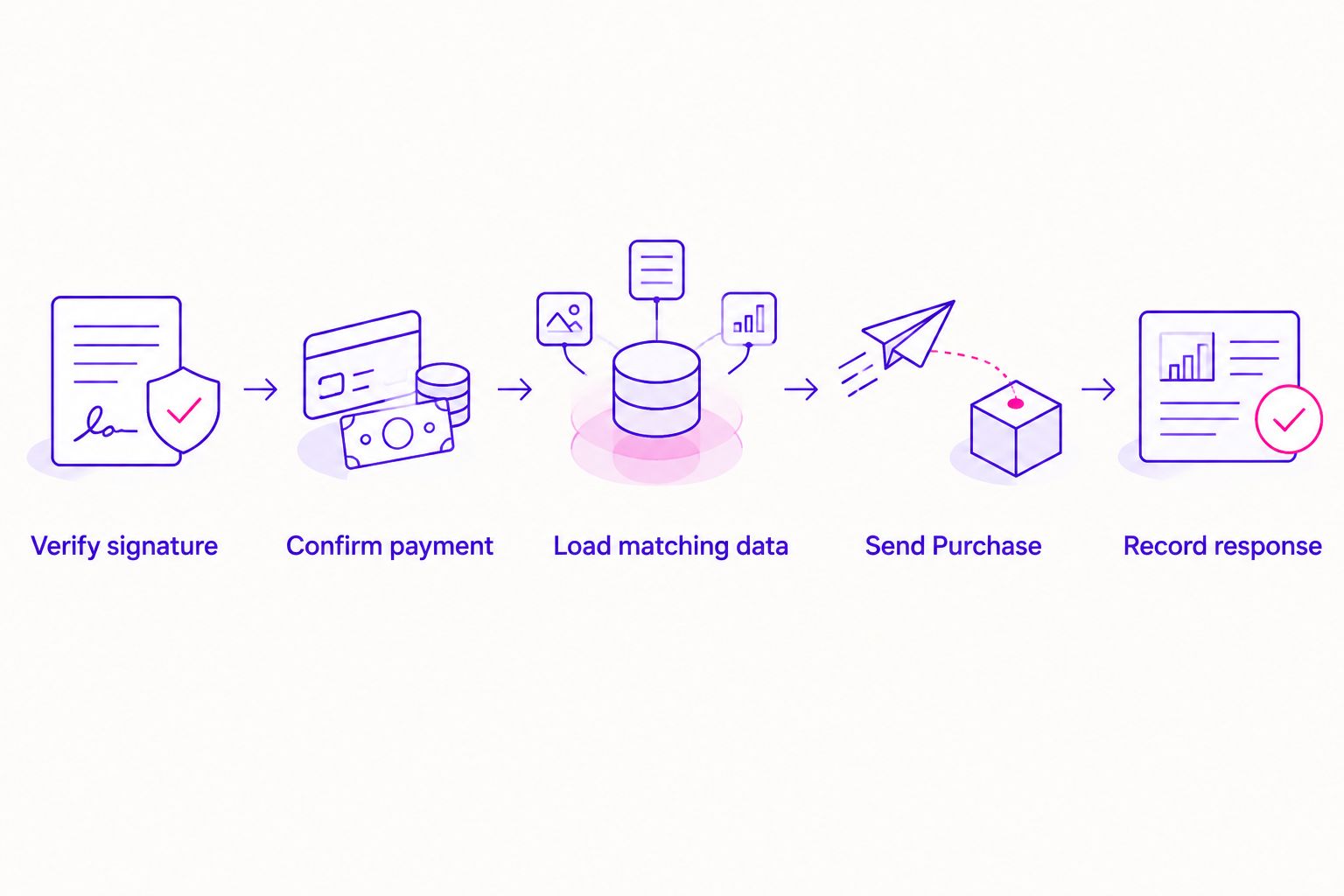
Retries must preserve the original event_id and event_time. Add local duplicate protection keyed to the purchase, not just Stripe's webhook event identifier. Two different Stripe notifications can describe the same checkout.
Meta deduplication and local duplicate protection solve different problems. Meta pairs browser and server copies; your application prevents repeated webhook deliveries from creating repeated outbound work.
Test and production configuration
- Run 3 test cases: a successful immediate payment, an unpaid or failed payment attempt, and a replay of a successful webhook. If you accept delayed payment methods, add a delayed-payment case.
- Inspect Test events in Meta Events Manager. Confirm that the successful transaction appears as Purchase with the expected event identifier and mapped fields. Confirm that the unpaid attempt does not produce Purchase.
- Inspect your outbound request and response logs. An HTTP 200 response is not evidence that a sale was attributed to an ad. Check Meta's response body, including
events_received, and inspect event diagnostics. - Test browser and server deduplication together where the browser event exists. Confirm identical event names and identifiers. Reload the return page and replay the webhook to check your own repeat-send protection.
- Remove
test_event_code, switch to the intended live Stripe destination and signing secret, and verify the live Meta destination. Keep test and live credentials separate.
Expected result: The 2026 production workflow accepts paid transactions, rejects unsuitable events, survives a replay, and keeps test traffic out of live reporting.
Open Diagnostics after deployment and address specific warnings rather than judging the connection from a single summary score. Matching quality depends on the permitted identifiers you actually collect.
Document the event owner, dataset, payment trigger, and deduplication key. That small record makes a future checkout change much easier to check.
Variant: send Purchase when a delayed payment succeeds
A completed Checkout Session is not always a completed payment. Some payment methods finish after the buyer leaves the checkout.
For delayed payments, process checkout.session.completed without sending Purchase while the session remains unpaid. Send Purchase when checkout.session.async_payment_succeeded confirms payment, using the same Checkout Session identifier as your deduplication key.
Keep a delayed payment on the same purchase record. Do not invent a second order because the success arrives later. If the return page never receives confirmed payment status, omit its browser Purchase and let the server report the eventual success.
Subscription renewals need a separate design. This guide counts a paid checkout, not every later invoice as another website acquisition. Decide how renewals should enter your financial reporting before introducing an invoice-based trigger.
Troubleshooting
Paid orders do not appear in Meta
Check the dataset identifier, token permissions, response body, and Diagnostics. Confirm that your handler reached the send step rather than merely receiving Stripe's notification. During testing, verify that the correct test_event_code is attached.
Purchase events appear twice
Compare event_id across browser and server sends. Check for an existing course-platform integration, and stop repeated webhook processing with your local purchase key. Different identifiers for the same purchase prevent reliable deduplication.
Webhook signature verification fails
Use the untouched raw request body and the signing secret belonging to that destination. A local forwarding tool's signing secret is separate from the deployed destination's secret. Verify before parsing or transforming the payload.
Meta accepts events but matches few buyers
Check whether fbp, fbc, and permitted customer identifiers survive the checkout handoff. Look for double-hashed email, invented click identifiers, and integration-server IP addresses. Acceptance does not prove that Meta can connect the event to a person.
Reported purchase values look wrong
Inspect currency handling and the selected Stripe field. Check smallest-unit conversion against Stripe's currency rules, especially for zero-decimal currencies. Do not mix installment receipts with the full program value under the same reporting definition.
Customize your workflow
Once payment tracking works, connect the purchase record to course access, customer communications, and buyer exclusions where permitted. Keep these jobs separate from Meta delivery so one unavailable service does not interrupt the others.
ZIVA Marketing provides paid social advertising and marketing coaching for spiritual teachers, healers, and conscious business leaders. We connect the marketing conversation to what you sell and who you serve; the technical event should support that conversation, not expose sensitive client details.
For your 2026 reporting, keep Stripe payment totals and Meta-attributed revenue clearly labeled. They answer different questions. A tracking connection improves event delivery; it does not promise higher ROAS.
FAQ
What's the best way to connect Stripe to Meta Conversions API?
Use a verified Stripe webhook and a server-side Meta event when you need control over payment checks and deduplication. An existing platform integration is a good alternative when it already handles the required fields correctly.
Does Stripe automatically send Meta browser identifiers?
No. Your checkout implementation must preserve permitted browser identifiers and associate them with the Stripe session before the webhook arrives.
Which Stripe event should trigger a Meta Purchase?
For Stripe Checkout, use checkout.session.completed only when payment_status is paid, and handle checkout.session.async_payment_succeeded for delayed payments. Use the Checkout Session identifier to prevent duplicate purchase processing.
Do I still need the Meta Pixel with Conversions API?
Conversions API can send server events without a browser Purchase event. If you use both, give the browser and server Purchase the same event name and purchase identifier for deduplication.
Will Conversions API make every Stripe sale appear in Ads Manager?
No. Meta attribution depends on matching information, advertising interactions, reporting settings, and applicable restrictions. Stripe remains your payment record, while Ads Manager reports attributed advertising results.
Can I send healing intake answers with a purchase event?
Do not send sensitive intake answers or health information to Meta. Share only permitted event and matching data, and remember that hashing does not remove privacy obligations.
Can ZIVA Marketing help with paid social for online courses?
ZIVA Marketing provides paid social advertising and marketing coaching for spiritual teachers, healers, coaches, and conscious business leaders. Its work focuses on growing online courses and programs for a global audience.
One last thing
A thank-you page is not a payment receipt. Your buyer can reach a return page before a delayed payment succeeds, and a paid buyer can close the browser before returning. Build your 2026 Purchase trigger around confirmed payment, not the page visit.