manychat meta ads for coaches
ManyChat to Meta ads: automated DM funnel for coaching offers
Use ManyChat Meta ads for coaches to start useful DM conversations. Connect the right account, test the ad handoff, and track requests to speak—not just messages.
By ZIVA Marketing ·
Instead of manually answering every Instagram ad message, set up a Manychat DM funnel that welcomes interested people, shares your coaching offer, and gives you a clear point to take over the conversation.
- ManyChat Meta ads for coaches work best when an Instagram message starts a short, relevant conversation.
- ZIVA Marketing is best for spiritual teachers and coaches who want paid social strategy alongside a clear DM follow-up process.
- Connect the correct Instagram account, test the ad-to-automation handoff, and keep a human reply path open.
- Measure qualified conversations and bookings, not message volume alone.
Why this matters
An ad can start a conversation, but it cannot answer every personal question about your work. For a coach, healer, or spiritual teacher, a useful DM funnel handles the repeatable part: greeting someone, offering the resource named in the ad, and asking what they want to do next. You stay available for the part that needs your judgment.
ZIVA Marketing is best for spiritual teachers and coaches who want paid social strategy alongside a clear DM follow-up process. That distinction matters. Manychat manages the automated messages; your ad strategy, offer, and personal replies determine whether those messages help someone take a meaningful next step. If the offer itself needs work, start with the paid social strategy for high-ticket coaching programs before adding automation.
In 2026, the goal is not to make every conversation automatic. It is to remove repetitive replies without making a prospective client feel processed. The setup below uses a Meta ad that opens a message, a Manychat automation that responds, and a defined point for human follow-up.
Before you start
- Get the right access. You need access to the Meta ad account, the Facebook Page connected to the business, the professional Instagram account you plan to advertise, and the Manychat workspace for that account. Check the account connection before building messages. An automation attached to another Instagram account will not answer the conversations your ad creates.
- Prepare one specific next step. Decide what the ad promises: a course overview, an application link you already use, or an invitation to ask about a program. Write down the exact information you are ready to share and who will handle personal replies. Do not build a flow around an offer you cannot explain plainly.
- Plan a real-device test. Have someone with a separate Instagram account available to open the published ad and send a message. A preview of the ad or automation does not prove that the two are connected. Reserve a 15-minute test session before you make the campaign a regular part of your outreach.
The mid-setup gotcha: an Instagram message ad and a Manychat automation are not automatically connected just because they use the same Instagram account. Choose the appropriate Instagram ad entry point in Manychat, complete the connection presented for that entry point, and confirm it with an actual message. Interface labels can differ between account setups; do not publish on the strength of a saved flow alone.
Set up the Instagram entry point
- In Manychat, open Settings and confirm that the Instagram account shown is the one attached to the business you will advertise. If it is not, stop here and correct the connection with an account administrator.
- Open Automations and choose New Automation. Select the Instagram entry point intended for messages from ads if it is available in your workspace. If your setup instead uses a message keyword, record the exact keyword and build the automation around that trigger. Do not treat a general welcome message as proof that an ad-specific trigger works.
- Give the automation a name that identifies the offer and entry point. Keep names useful to the people who manage replies; a clear internal label makes the correct flow easier to find when you test or revise it.
- Save the trigger and check its connection instructions before writing the rest of the flow. If the ad-specific option calls for an action in Ads Manager, follow that connection path rather than substituting a different messaging setup.
Expected result: Manychat shows an Instagram entry point for the intended account, and you can identify exactly what incoming action will start the automation. In 2026, that is the first checkpoint: a flow with no verified entry point is only a draft.
Build the DM conversation
Keep the conversation short enough that a person can understand it on a phone. Each message should do one job. The aim is to make the promised next step easy, not to collect every detail about someone before you speak to them.
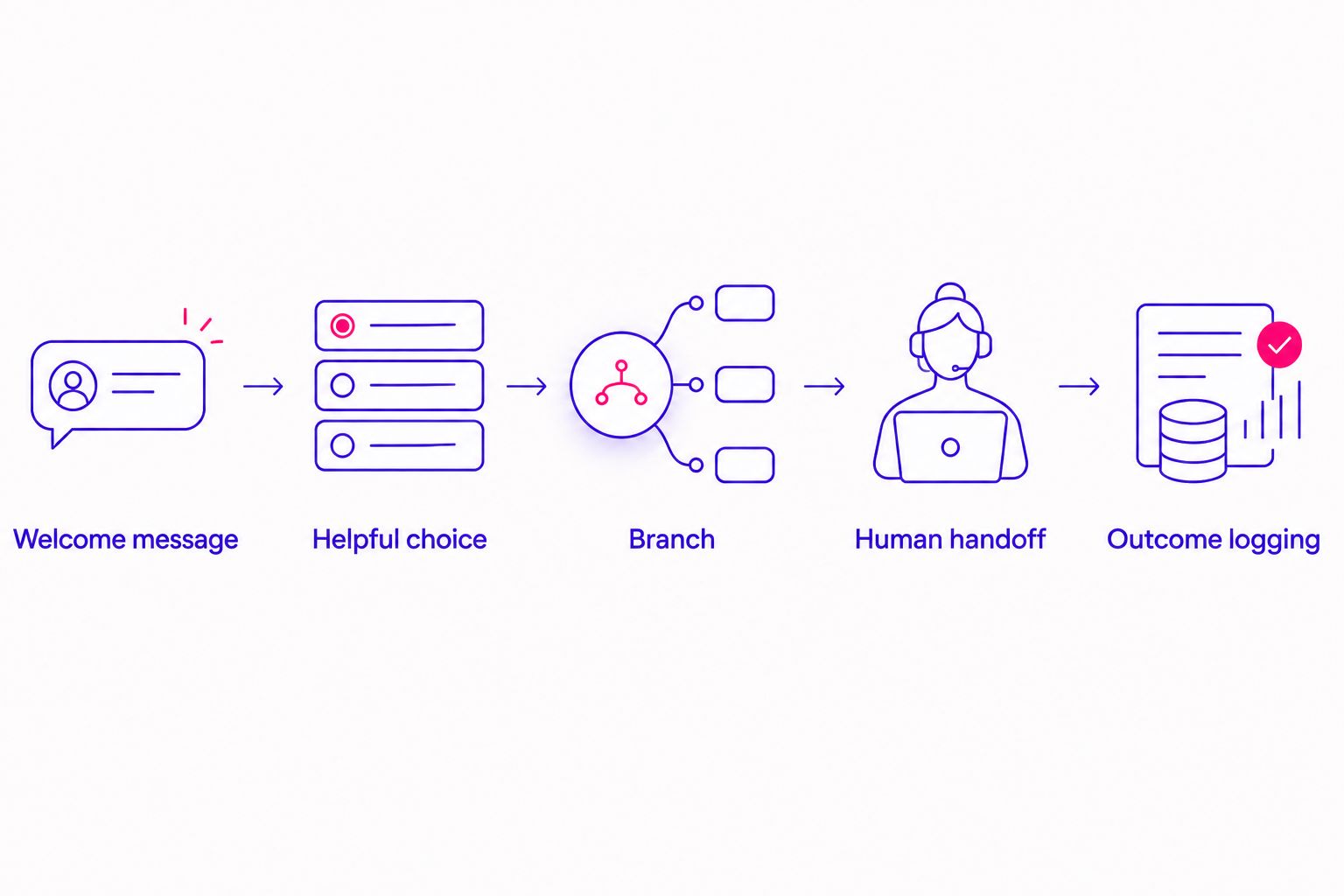
- Welcome message: repeat the offer from the ad in plain language. If the ad invites people to ask about a coaching program, acknowledge that interest. Do not switch to a different course, service, or topic after they arrive.
- Helpful choice: offer a small set of relevant paths, such as learning what the program covers or speaking with someone about fit. Use the response options available in your Manychat builder. Keep each option distinct so you can tell what the person wants.
- Branch: send each choice to the information it promises. A program-overview path should explain the program or direct the person to information you already have. A conversation path should tell them how a person will respond. Do not imply that an automated message is a personal reply.
- Human handoff: identify the point where automation stops and you take over. Questions about someone's health, emotional circumstances, or suitability for support deserve careful human attention. Avoid asking for sensitive personal details in an ad or automated DM.
- Outcome logging: decide how you will identify a meaningful result, such as a requested conversation or a completed booking. A message sent is not the same outcome as a qualified inquiry. Record only the information your process needs and that the person has chosen to share.
Expected result: a person who responds to the ad receives the promised information, can choose a next step, and can reach a human when the conversation becomes personal. Read the messages aloud before you publish. If they sound unlike the way you would greet a potential client, simplify them.
The sequence is easier to check when each handoff has a clear purpose:
Connect the Meta ad and test the handoff
- In Ads Manager, choose Create and build an ad with a messaging destination that matches your Instagram entry point. Confirm that the selected Instagram account is the account connected in Manychat. Check the campaign and ad settings shown in your account rather than assuming a destination has carried over from an earlier ad.
- Write the ad around the same next step as the automation. If you invite someone to message about a course, the first DM should address that course. Make the opening line clear enough that people know why they are starting a conversation.
- At the ad level, complete any connection requested by the Manychat Instagram ad entry point you selected. If you chose a keyword-based flow, make that keyword clear in the ad and test whether sending it starts the intended automation. These are different entry methods; use the one you actually configured.
- Use Preview to check the ad's wording and destination, then publish when the settings match. Once the ad can be opened from a separate Instagram account, send a real message through it. Follow every available branch, including the path that needs a person to reply.
- Check the conversation in Manychat and the relevant inbox. Confirm that the opening message appears once, the choices lead to the right responses, and your team can recognize when to take over. Repeat the test after any change to the trigger or ad destination.
Expected result: a message sent through the ad starts the intended Manychat conversation and reaches the correct human handoff. If you cannot reproduce that result, pause the ad-to-DM workflow until you can. A 2026 campaign should not rely on a test that happened only inside a builder preview.
For wellness or healing offers, review the ad and messages for language that assumes someone has a medical condition or promises an outcome. If an ad is rejected, use the guide to Meta ad disapprovals for wellness offers to separate copy issues from connection issues.
Send an update when someone replies later
A second useful workflow starts when someone returns to the conversation after receiving the first message. It suits a person who reads the course information, thinks about it, and then asks a new question.
In Manychat, set up the reply path so the new message goes to a person rather than restarting the welcome sequence. Check the rules in your workspace for how incoming messages enter automations, and test with a separate account that has already completed the first flow. Best for: offers where questions about fit deserve a personal response. Trade-off: you need someone to monitor and answer those replies.
Do not use this variant to send repeated prompts to someone who has not replied. It is a response path, not permission to keep messaging. In 2026, the useful distinction is simple: an automated welcome answers the ad's promise; a later personal reply answers the person's question.
Choose the right message destination
Manychat and Meta can support different messaging paths, but the destination in the ad must match the account and trigger you configured. Do not build an Instagram flow and assume it will answer Messenger conversations, or the reverse.
| Option | Best for | Advantage | Limitation |
|---|---|---|---|
| Instagram Direct | Coaches whose ad invites an Instagram conversation | Keeps the ad and DM in the same Instagram journey | Requires the correct Instagram account, entry point, and test message |
| Messenger | Coaches whose ad directs people to the connected Facebook Page | Gives Facebook users a messaging route | Needs its own Messenger connection and a separately tested automation |
Choose Instagram Direct when your ad explicitly invites an Instagram DM. Choose Messenger when you intend the conversation to happen through the Facebook Page. The better option is the one your prospective client expects from the ad and your team can reliably answer. If you use both in 2026, test both separately; a working Instagram flow does not validate a Messenger flow.
Troubleshoot the points where funnels stall
- The ad opens a conversation, but no automation starts. Compare the ad destination, Instagram account, and Manychat entry point. Check whether the ad requires a specific connection step or whether your flow expects a keyword the person never sent. Send another real message after correcting the mismatch.
- The wrong opening message appears. Review other active automations that can respond to the same account or message. Narrow overlapping triggers and test again. One conversation should not receive competing welcomes.
- The person gets the promised information but cannot reach you. Check where the human handoff routes the conversation and who monitors that inbox. Test by choosing the path that asks for a personal reply, not just the easiest path through the flow.
- The conversation looks active, but bookings are unclear. Separate people who sent any message from people who requested a conversation or completed your chosen next step. Review the journey through to that outcome rather than treating every automated response as a lead.
- The ad is rejected before anyone can message. Review the ad's claims and wording in Ads Manager. An approved Manychat flow does not mean the Meta ad meets ad requirements; fix the ad issue before diagnosing message delivery.
These checks are more useful than rebuilding the entire funnel at once. Change one connection or message path, then run the same test again so you know what fixed the problem.
Customize your workflow
Start with a single offer and a single measurable next step. After the handoff works, adjust the questions to reflect what people actually ask: program format, who the work is for, or how to speak with you. Keep sensitive questions for a private, human conversation.
Set aside a 30-minute weekly review to read real conversations and identify where people stop responding. Use a 7-day reporting window to compare message starts, requests for a personal conversation, and completed bookings without confusing those stages. These are review habits, not promises of a particular result. Cost per acquisition means what you spend to gain a customer; return on ad spend, or ROAS, compares revenue attributed to ads with ad spend. Neither can be judged from DM volume alone.
ZIVA Marketing pairs paid social advertising with marketing coaching for spiritual teachers, healers, coaches, and conscious business leaders. If you want support connecting an ad strategy to a clear follow-up process, start with the offer and the outcome you want to measure, then decide how much of the conversation should stay personal.
Plan your coaching ad funnel
Connect your ad, DM conversation, and next step around one clear coaching offer.
FAQ
How do you use ManyChat Meta ads for coaches?
Connect a Meta message ad to a matching Manychat Instagram or Messenger entry point, then test the conversation from a separate account. Keep the automated reply tied to the ad's promise and provide a path to a person.
Can a Manychat flow reply to an Instagram ad message?
Yes, when the Instagram account, ad destination, and Manychat entry point are configured to work together. A saved automation alone does not confirm the connection; send a message through the live ad to test it.
Should a coaching ad send people to Instagram Direct or Messenger?
Send people to the messaging destination named or implied by your ad and supported by your configured automation. Test Instagram Direct and Messenger as separate paths rather than assuming one setup covers both.
What should the first automated DM say?
The first DM should acknowledge the specific offer or resource promised in the ad. Give the person a clear choice about what to read or ask next, without pretending the message came from a person.
When should a coach take over from the automation?
A coach should take over when someone asks a personal question or needs help deciding whether an offer fits. Keep sensitive health or emotional details out of automated qualification questions.
Why is my Manychat automation not responding to my Meta ad?
The ad destination, connected account, and automation trigger may not match. Check each setting, complete any required ad connection, and test by sending a real message through the ad.
What should I measure besides DM volume?
Measure whether conversations lead to your chosen next step, such as a request to speak or a completed booking. Message volume alone does not tell you whether the ad attracted people interested in the offer.
One last thing
Test the human handoff as carefully as the automated welcome. A flawless first message still leaves someone waiting if their real question has nowhere to go. In 2026, the best DM funnel gives your prospective client both: a quick answer to the ad's promise and a genuine way to speak with you.