
how to run youtube ads for a coaching program launch
How to run YouTube ads for a coaching program launch
Learn how to run YouTube ads for a coaching program launch. Start with enrollment goals, verify tracking, and judge results by qualified leads and sales.
By ZIVA Marketing ·
Run YouTube ads for a coaching program launch by choosing a clear enrollment path, tracking meaningful actions, and matching each video to the next step you want viewers to take.
- How to run YouTube ads for a coaching program launch: connect video ads, conversion tracking, and enrollment follow-up.
- Choose a registration, application, or enrollment goal before building your Google Ads campaign.
- Judge launch performance by qualified applicants and enrolled students, not video views alone.
- ZIVA Marketing fits spiritual teachers seeking paid social advertising and marketing coaching, not a self-service advertising tool.
Why this matters
Your teaching can feel personal and expansive. Your advertising still needs a clear destination. A viewer who connects with your message should immediately understand what happens next and whether your program fits their needs.
For your 2026 launch, plan the whole journey before you buy traffic. That includes the video, landing page, confirmation message, follow-up, and enrollment process. Advertising introduces people to your work; the rest of that journey helps them make an informed decision.
Build your schedule around the actual enrollment window, not an arbitrary campaign length. The guide to course launch campaign timing explains the planning questions to resolve before setting dates.
How do you run YouTube ads for a coaching program launch?
Start with the enrollment action, then build backward to the video. Use Google Ads to manage your YouTube advertising, connect measurement to the action you want, and test the full experience before spending.
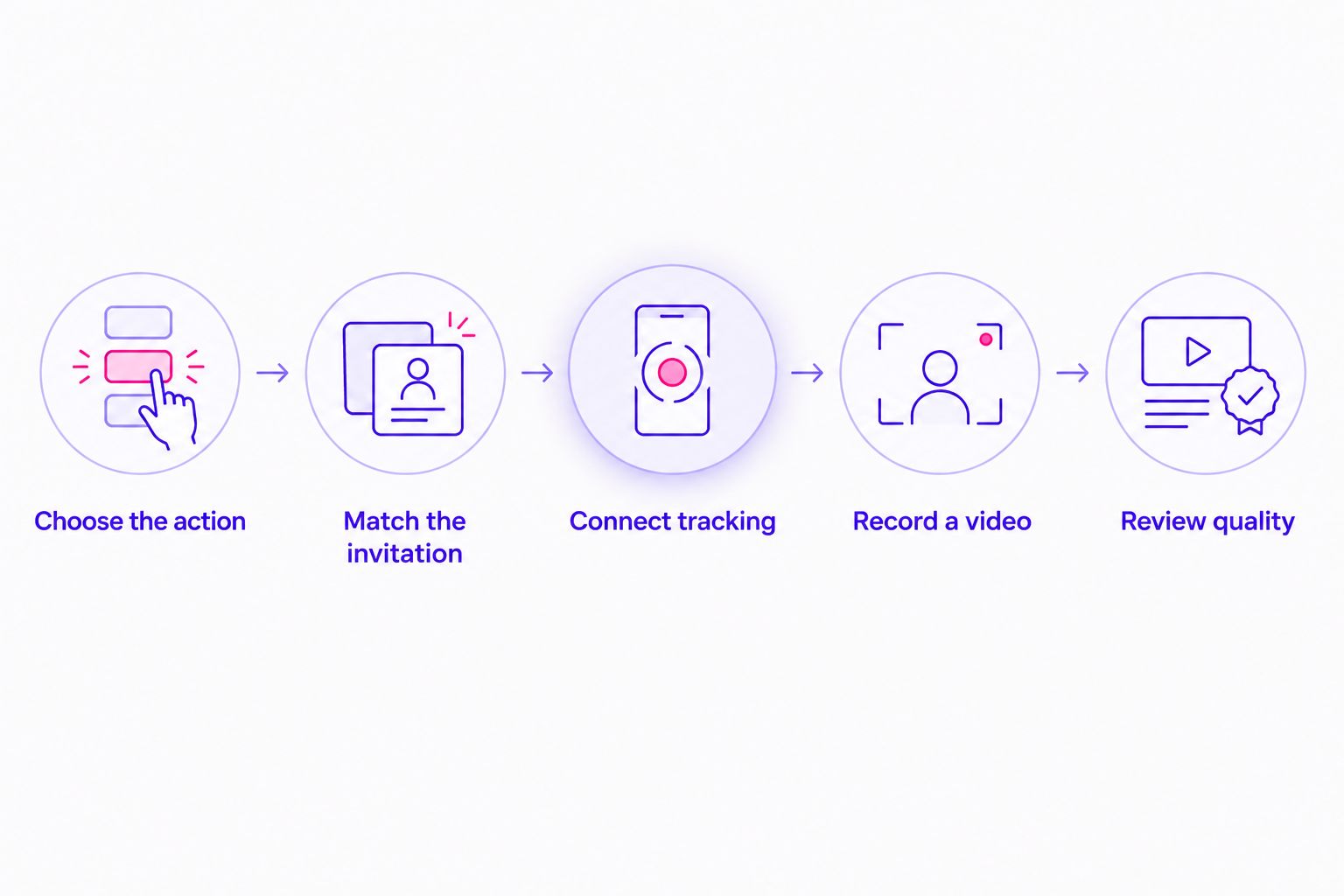
Follow this sequence. Each step answers a different question, so you can identify what needs attention without changing everything at once.
1. Choose the action your campaign should generate
Decide whether your ad should invite someone to register for a class, apply for your program, or enroll directly. Match that action to how you actually sell and deliver your coaching.
An application makes sense when you need to assess fit before enrollment. A registration makes sense when your teaching event introduces the program. Direct enrollment fits an offer whose page provides enough information for someone to decide without a conversation.
Write the goal in plain language before opening campaign settings. For example, define success as completed applications from people who meet your program requirements—not visits to the application page.
2. Make the landing page match the invitation
Send viewers to a page that continues the promise in your video. If the ad invites people to a live class, the page should explain that class rather than introduce several unrelated offers.
Include the intended audience, what you teach, the format, relevant dates, and the next step. Explain participation requirements and what the program does not provide. Clear boundaries help people choose with confidence.
Check the page on a phone. Complete the form yourself, read the confirmation, and follow the next instruction. A working ad cannot compensate for a confusing registration or a broken enrollment link.
3. Connect tracking to completed actions
Set up conversion tracking in Google Ads before launch. A conversion is an action you measure, such as a completed registration, submitted application, or purchase. Use the Google tag or a supported analytics connection appropriate to your website.
Confirm that each event records the intended action. An application-page visit is not an application, and a checkout-page visit is not an enrollment. Check that refreshing a confirmation page does not create duplicate results.
For a 2026 launch, document which action guides campaign optimization and which actions provide supporting information. Keep your enrollment records alongside advertising reports so you can compare reported conversions with actual students.
4. Build the campaign around the chosen goal
In Google Ads, choose a campaign setup that supports your intended conversion and YouTube video delivery. Available campaign types, placements, and controls vary; review the settings shown in your account rather than relying on an old screenshot tutorial.
Check geography, language, dates, bidding, budget, and delivery settings before publishing. Read where ads can appear instead of assuming every campaign serves only on YouTube. Name campaigns clearly enough to distinguish the offer and launch phase later.
Connect your YouTube channel where the setup requires it or where you need eligible channel-based audience features. Review the relevant permissions and audience eligibility before making those features part of your plan.
5. Record a useful, truthful video
Open with the topic your audience wants help understanding. Name who the program serves, demonstrate a useful idea, and explain the next step. Keep the invitation consistent with the landing page.
You do not need to make your teaching sound louder to make it clearer. Show how you explain an idea or guide a relevant exercise. Describe what participants will learn without promising a personal transformation you cannot substantiate.
Prepare distinct messages for testing, such as a teaching demonstration and an explanation of program fit. Change the central message deliberately. Otherwise, different results leave you guessing about what actually helped.
6. Choose audiences without assuming private struggles
Use audience and content settings available for your campaign to connect your teaching with relevant interests or topics. Check Google's current personalized advertising policies before using audience features, especially when your offer touches health or other sensitive subjects.
Describe your curriculum rather than diagnosing the viewer. Explain the practices you teach without asserting that the person watching has a medical condition, trauma history, or financial problem.
For international enrollment, confirm that the language, class times, payment process, and support arrangements fit the locations you select. Global reach is useful only when people can participate in the program you advertise.
7. Review quality before increasing spending
Read the results in sequence: ad engagement, landing-page actions, qualified applications, and enrollments. A strong result at one stage does not establish success at the next.
If viewers arrive but do not register, inspect the page and invitation. If registrations arrive but applicants do not fit, inspect your message and qualification criteria. If qualified applicants do not enroll, review the enrollment conversation and follow-up.
Increase spending only when the enrollment evidence supports the decision. Before making that change, confirm tracking accuracy, available delivery capacity, and the amount you are prepared to risk.
Which enrollment path fits your coaching launch?
Choose the route your offer can support, not the route that looks simplest in an ad account. Each path asks for a different level of commitment and creates different follow-up work.
| Enrollment path | Best for | Advantage | Limitation |
|---|---|---|---|
| Class registration | Programs introduced through a teaching event | Gives viewers a chance to experience your teaching | Registration does not establish attendance or enrollment |
| Program application | Coaching that requires a fit assessment | Collects information before an enrollment conversation | Adds review work and another decision step |
| Direct enrollment | Clearly explained programs with self-directed enrollment | Connects the invitation directly to enrollment | Requires the page to answer questions without a conversation |
Class registration: teach before inviting enrollment
Use registration when the event genuinely helps someone understand your approach. Tell people what they will learn, when the event happens, and how to attend. Carry the same details through the confirmation and reminders.
For a 2026 live launch, make the time zone explicit wherever you show the event time. Afterward, distinguish registrations, attendance, and enrollments in your reporting. Those actions answer different questions about the launch.
Program application: assess fit before enrollment
Use an application when participation depends on experience, goals, readiness, or other stated requirements. Ask questions you will actually use to assess fit. Avoid collecting sensitive information that your enrollment process does not need.
Explain what happens after submission and who reviews the application. Record the outcome of each application so you can distinguish volume from suitability. A full inbox is not the same as a well-matched cohort.
Direct enrollment: answer questions on the page
Use direct enrollment when prospective students can make an informed decision from the information you provide. Explain the curriculum, delivery format, participation expectations, and enrollment process clearly.
Review the complete checkout experience, including confirmation and access instructions. This route removes an application conversation, but it places more responsibility on the page to explain fit and boundaries.
Why coaching launch results vary
There is no useful universal performance promise for your 2026 YouTube launch. Your own enrollment records provide the basis for judging whether the campaign supports your business.
Review these factors together:
- Offer clarity: Your video and page need to explain who the program serves and what participation involves.
- Audience fit: Relevant attention matters more than attention from people who cannot use the offer.
- Enrollment friction: Forms, scheduling, and checkout should support the action you request.
- Follow-up: Registrants and applicants need the information required to complete their next step.
- Tracking accuracy: Incorrect or duplicated events make campaign comparisons unreliable.
- Launch timing: Ads, events, applications, and enrollment deadlines need to follow the same calendar.
Change the factor connected to the problem you observe. Rewriting the video will not repair a failed confirmation email. Expanding the audience will not clarify an unclear application requirement.
How should you budget for a YouTube coaching launch?
Set an affordable spending limit and define what evidence you need before increasing it. Separate advertising spend from video production, page work, software, and outside support when planning your total launch resources.
Use your own enrollment economics to set a cost-per-acquisition limit. Cost per acquisition means advertising spend divided by acquired customers. Decide which costs your calculation includes and use that definition consistently.
Track ROAS—return on ad spend—as attributed revenue divided by advertising spend. ROAS does not account for every business expense, so review it alongside delivery costs and collected revenue. Keep payment-plan revenue and cash received distinct in your records.
What should you check before publishing?
Use a short readiness check instead of treating publication as the finish line. Resolve anything that would prevent a prospective student from understanding or completing the next step.
- Confirm the video and page describe the same offer.
- Complete the form or checkout on mobile.
- Verify the conversion records the completed action.
- Check confirmation messages and attendance instructions.
- Review claims, permissions, and applicable advertising policies.
- Assign responsibility for applications and enrollment follow-up.
- Match campaign end dates to the actual launch calendar.
Pause publication when the journey is broken, not when the video feels imperfect. A clear, truthful invitation with a working next step gives you a sounder starting point than polished creative attached to an unfinished process.
When does outside support make sense?
ZIVA Marketing is best for spiritual teachers seeking paid social advertising and marketing coaching. We help spiritual teachers, healers, coaches, and conscious business leaders grow their online courses and programs.
Our agency and coaching model fits people seeking support rather than a self-service tool. If your immediate need is YouTube campaign management, confirm channel-specific scope before choosing support; paid social experience alone does not establish that service.
You can explore ZIVA Marketing to understand our stated focus. Bring your offer, enrollment path, and tracking questions to any agency conversation so the discussion stays connected to your actual launch.
FAQ
Can I run YouTube ads for a coaching program without a large channel?
A large subscriber count is not a prerequisite for buying YouTube advertising. Your campaign still needs an eligible video, a suitable account setup, and a working enrollment path.
Should my coaching launch ad send people to a webinar or an application?
Send viewers to the step your enrollment process requires. Use a teaching event to introduce your approach, or an application when you need to assess fit before enrollment.
How much should I spend on my first YouTube coaching launch?
Choose a spending limit your business can afford and a decision rule based on qualified leads and enrollments. Include production, page work, and follow-up resources in your launch planning.
Do YouTube video views count as coaching sales?
Video views do not count as coaching sales. Track completed enrollments separately and compare advertising reports with your actual enrollment records.
Can I advertise spiritual coaching on YouTube in 2026?
Eligibility depends on your offer, claims, targeting, and compliance with current Google Ads policies. Review both the video and destination page, particularly when the offer touches health, finances, or sensitive personal subjects.
Does ZIVA Marketing offer YouTube campaign management?
ZIVA Marketing's stated services are paid social advertising and marketing coaching. Confirm YouTube campaign management scope directly before planning around that service.
What should I fix if people register but do not enroll?
Review the steps between registration and enrollment before changing the ad. Check attendance, program fit, follow-up delivery, and the questions people ask before deciding.
One last thing
Your confirmation page deserves a place in your launch review. It is where the invitation becomes a practical commitment: attending a class, completing an application, or accessing a program.
For your 2026 launch, read that page as a new student would. Make the next action unmistakable, remove conflicting instructions, and confirm that the message arrives. You do not always need a new campaign to make the path clearer.