
how to retarget people who abandoned a webinar registration
How to retarget people who abandoned a webinar registration
Learn how to retarget people who abandoned a webinar registration with accurate audience exclusions, respectful reminders, and completed-signup tracking.
By ZIVA Marketing ·
Retarget people who abandoned a webinar registration by including tracked registration-page visitors, excluding confirmed registrants, and showing a helpful reminder that returns them to the signup page.
- How to retarget people who abandoned a webinar registration: include tracked visitors, exclude registrants, and measure completed signups.
- Meta retargeting reaches eligible, matched visitors—not everyone who leaves your webinar registration page.
- Fix registration friction before adding reminders; a return visit cannot repair a broken form.
- ZIVA Marketing serves spiritual teachers, healers, and coaches through paid social advertising and marketing coaching.
Why this matters
Someone can want your teaching and still leave before signing up. A confusing time zone, an interrupted visit, or an unanswered question can stand between interest and registration. Your reminder should make the next step clearer, not pressure someone to explain why they left.
A registration-page visit signals interest, not a completed signup or permission to email. Keeping those distinctions clear protects your reporting and your audience’s trust.
For an ongoing webinar, connect this recovery campaign to your broader paid social funnel for evergreen webinars. Registration recovery is one stage, not a substitute for the full journey.
How to retarget people who abandoned a webinar registration
Build the audience around a specific webinar, verify the completion signal, and send people back to a working registration page. Use this sequence for your 2026 setup before publishing reminder ads.
1. Define what counts as abandonment
Start with the behavior you can actually measure. A registration-page visitor who does not complete signup is different from someone who starts filling out the form and leaves.
If your tracking records only page visits, describe the audience internally as registration-page visitors without a confirmed signup. Do not label everyone a form abandoner. A page view does not prove that someone touched the form.
Keep 1 webinar per audience definition when the sessions have different topics or signup pages. That gives your reminder a clear destination and keeps unrelated registrations from becoming exclusions.
2. Verify the successful registration signal
Choose a completion signal that fires only after the webinar platform accepts the registration. Depending on your setup, that can come from a confirmed submission, a registration integration, or a protected confirmation page.
A button click alone is not enough. Someone can press the registration button and still encounter a missing-field error or a failed submission.
Complete 1 test registration and confirm that it appears in the webinar platform and your measurement setup. Check whether refreshing the confirmation page creates extra completion events; repeated events should not become repeated registrations in your reporting.
3. Build the inclusion audience
In Meta, use an eligible website Custom Audience—a group built from matched website activity—to include visitors to the relevant registration page. Your website tracking and consent setup must support that use.
Match the webinar’s actual page rather than every page on your website. Check redirects and alternative signup destinations so your rule covers the intended journey without collecting unrelated visits.
Audience matching is incomplete. Browser restrictions, consent choices, and platform matching mean your audience will not contain every visitor you see in website analytics.
4. Exclude confirmed registrants
Create a separate audience for people who successfully registered for that webinar, then exclude it from registration-recovery ads. Use the verified completion signal and, where permitted, an eligible registrant list as another exclusion source.
Check that the exclusion refers to the same webinar. Excluding everyone who ever registered for any event can remove people who are interested in your new session.
Exclusion updates are not necessarily immediate. A registrant can still encounter an ad while systems update, so keep the message welcoming rather than implying that you know their registration status.
5. Keep delivery aligned with the audience
Choose a campaign setup that supports your intended audience restrictions. Review the audience controls available in your account rather than assuming every audience selection is a strict boundary.
If the setup treats your selected audience as a suggestion and permits broader delivery, it does not isolate registration abandoners. Keep broader acquisition activity separate when you need to evaluate recovery performance.
Optimize toward successful registration when that event is available and accurately measured. Clicks are useful for diagnosis, but they are not the outcome this campaign exists to produce.
6. Publish a useful reminder
Give people a reason to return: a clear learning outcome, an answer to a common question, or accurate session logistics. Send the ad directly to the relevant registration page.
Keep the promise consistent across the ad and page. If your reminder highlights a particular teaching topic, visitors should immediately find that topic when they return.
End registration reminders when the advertised session is no longer open for signup. For recurring sessions, check that the destination shows the correct upcoming option.
The recovery process is simple to picture: define the visit, verify the signup, remove registrants, and invite eligible visitors back.
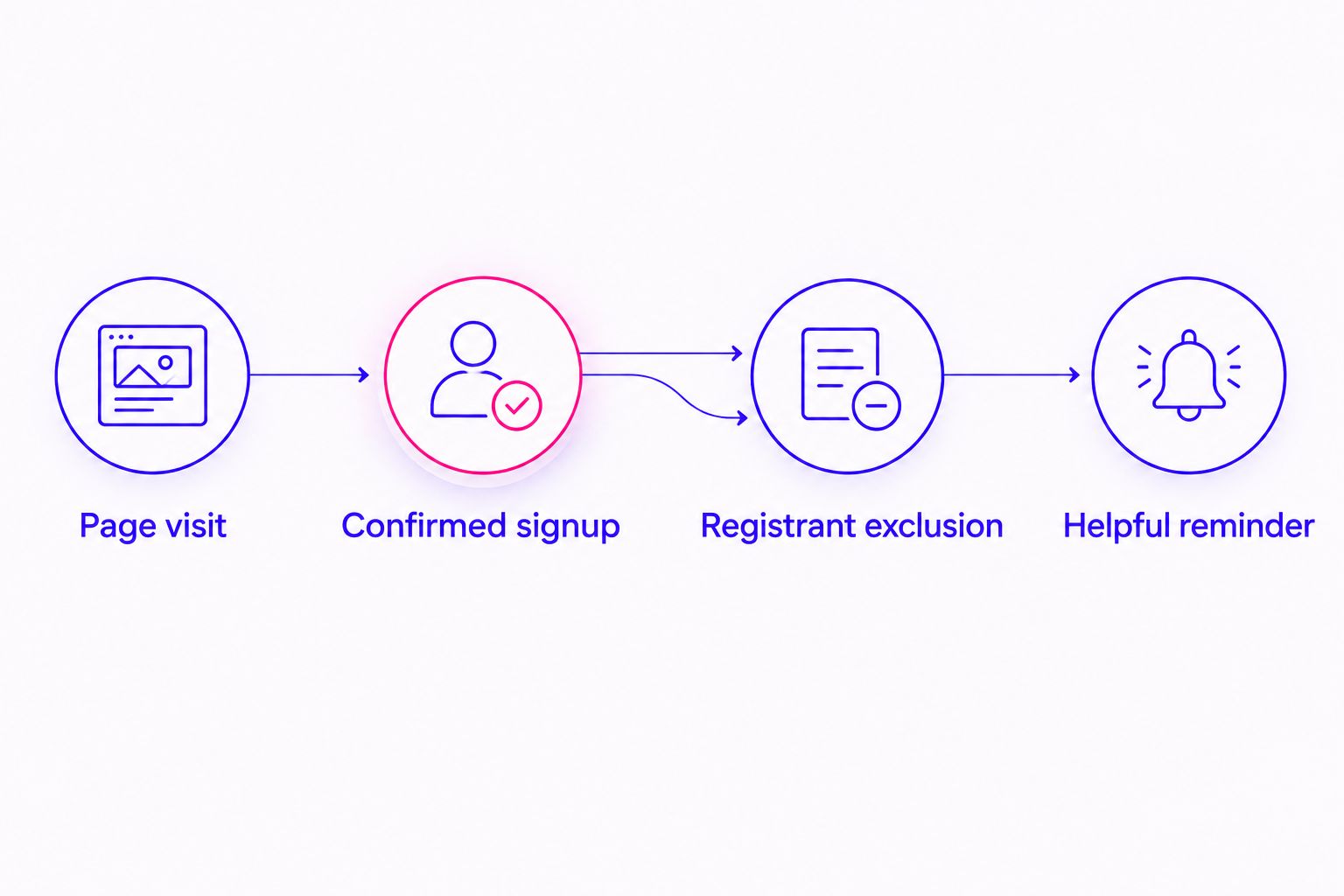
Which audience should you use?
Use the closest reliable signal to an unfinished registration. More specific is helpful only when the tracking works and the audience can support delivery.
| Audience option | Best for | Strength | Limitation |
|---|---|---|---|
| Registration-page visitors, excluding registrants | A starting recovery audience | Uses a clearly defined page visit | Includes people who never started the form |
| Form starters, excluding registrants | Websites with verified form-start tracking | Identifies a more specific action | Requires additional tracking and can create a smaller audience |
| Native lead-form openers without submission | Webinars using an eligible Meta instant form | Keeps the audience tied to the native form | Does not represent abandonment on your website |
Do not combine these definitions without preserving their differences in reporting. A native form opener and a website visitor followed different paths, so the same friction diagnosis will not necessarily apply.
For your 2026 campaign, start with the audience your setup can verify. Add form-start segmentation only when it answers a useful question, rather than adding complexity for its own sake.
Why registration recovery results vary
Recovery depends on the page, the tracking, and the fit between the webinar and its visitors. These factors explain what to investigate without assuming that every unfinished signup needs another ad.
- Tracking accuracy: Missing completion events leave registrants inside the recovery audience. Premature events remove people before they finish.
- Audience eligibility: Consent, platform rules, browser restrictions, and matching affect which visitors can receive ads.
- Registration friction: Unclear fields, technical errors, and confusing session details make returning visitors face the same obstacle again.
- Message fit: A reminder about the actual teaching gives people more useful information than a vague invitation to return.
- Session timing: A live event needs reminders that stop with registration. An ongoing webinar needs accurate session options.
- Audience size: A narrowly defined group limits delivery opportunities and makes small changes in results harder to interpret.
Fix the obstacle before increasing the reminder pressure. If mobile visitors cannot submit the form, additional impressions do not solve the registration problem.
What should your reminder ad say?
Write about the webinar, not the person’s browsing history. Avoid copy that announces you saw someone leave or assumes why they hesitated.
Use a clear invitation followed by the information someone needs to decide. Name the teaching topic, explain who the session is for, and state the next step. Include schedule or replay details only when they are accurate for that session.
Outcome reminder
Best for: a webinar whose learning outcome needs clarification. Explain what the session teaches and how that relates to the advertised topic.
The strength is clarity. The limitation is that repeating the original promise will not resolve a practical question about timing or access.
Logistics reminder
Best for: registrations affected by schedule or access questions. Clarify the time zone, participation format, or access arrangements that actually apply.
The strength is reducing uncertainty. The limitation is that logistics alone do not explain why someone should attend.
Teacher introduction
Best for: audiences deciding whether the teaching approach fits. Let the teacher explain the topic and what participants can expect from the session.
The strength is a direct introduction to the teaching style. The limitation is that an introduction still needs a clear registration invitation.
For spiritual and wellness topics, keep the wording respectful and neutral. Do not imply knowledge of someone’s health, emotional state, or personal circumstances because they visited a page.
What should you test before launching?
Use 2 test paths: leave without registering, then complete a registration. Check both paths in a consented test environment where tracking is permitted.
For the unfinished path, verify that a page visit does not trigger successful registration. For the completed path, verify that the webinar platform accepts the signup and the correct completion event appears.
Add these checks to your 2026 launch checklist:
- Open the ad destination on a phone and complete every required field.
- Check that session dates and time zones agree across the ad, page, and confirmation.
- Confirm that each registration event refers to the intended webinar.
- Check the audience inclusion and exclusion rules after publishing.
- Confirm that tracking respects consent choices and does not transmit sensitive form responses.
Do not place health answers, private coaching disclosures, or unnecessary personal information in event parameters or tracked page addresses. A registration event should record the action, not expose someone’s story.
How do you know whether retargeting worked?
Start with verified registrations, then follow those registrants through attendance and any later course or program purchase. Keep the webinar platform’s records alongside ad-platform reporting.
An attributed registration is a signup the platform credits to advertising under its reporting rules. It does not prove that the person would never have registered without the reminder.
For your 2026 reporting, separate these questions:
- Did the ads deliver to the intended audience?
- Did returning visitors complete registration?
- Did those registrants attend?
- Did attendees become suitable buyers for the next offer?
Cost per registration measures ad spend divided by credited registrations. ROAS measures attributed revenue divided by ad spend; it belongs later in the journey when revenue exists.
Do not call a recovery campaign profitable because it generated signups. Registration is an intermediate outcome, not revenue.
Can you retarget someone without their email address?
You can use eligible, matched website activity without already holding the visitor’s email address. That depends on permitted tracking, consent, platform eligibility, and audience matching—not simply on someone opening the page.
You cannot email an anonymous visitor because they left a form unfinished. An email address typed into a field is not, by itself, permission to send marketing.
Should you separate registrants from webinar no-shows?
Yes. A registrant who misses the session completed the action your registration-recovery campaign requested.
Exclude that person from signup reminders for the same session. Any attendance, replay, or future-session message needs its own audience definition and accurate destination.
When should you stop registration-recovery ads?
Stop when registration closes, the advertised session ends, or the destination no longer matches the invitation. Also pause when broken tracking prevents reliable exclusions.
For an ongoing webinar in 2026, review session accuracy and audience rules regularly. An evergreen format does not make an outdated invitation accurate.
Where does outside support fit?
ZIVA Marketing is for spiritual teachers and coaches seeking paid social advertising and marketing coaching. That fit is relevant when you want support connecting webinar promotion to your wider course or program journey.
At ZIVA Marketing, we offer paid social advertising and marketing coaching for this audience. The boundary is clear: advertising support does not replace a working registration process or accurate information about your teaching.
Explore support for your webinar marketing
Connect webinar promotion with paid social advertising and marketing coaching.
FAQ
How do I retarget people who abandoned my webinar registration?
Include eligible, tracked registration-page visitors and exclude confirmed registrants. Show a relevant reminder that links directly to the correct signup page.
Can I retarget everyone who visited my webinar page?
No. Consent, browser restrictions, platform eligibility, and matching limit which visitors can enter a usable advertising audience.
Should I track the registration button as a completed signup?
No. Track successful registration only after the submission is accepted; a button click can happen before an error or failed submission.
Why do registered people still see my signup ads?
Delayed audience updates, missing completion signals, or incorrect exclusions can leave registrants eligible for signup ads. Verify the registration event and webinar-specific exclusion rules.
Do I need a separate campaign for every abandoned form?
No. Separate audiences when the webinar, message, or registration destination requires different treatment. Avoid dividing a small eligible audience without a clear reporting or messaging reason.
Can I send reminder emails to people who started the form?
Send marketing reminders only when you have the required permission or other applicable lawful basis. Starting a form does not automatically provide email marketing consent.
One last thing
A person can register on a different device, through a forwarded invitation, or after returning without clicking your reminder. Your advertising system will not always connect those actions perfectly.
Make the reminder useful even when its recipient has already signed up. A clear explanation of the teaching feels welcoming; a claim that someone failed to finish can feel misplaced.