gohighlevel meta ads coaching funnels
GoHighLevel to Meta ads: 2026 workflow for coaching funnels
Set up gohighlevel meta ads coaching funnels in 2026: track form leads and booked calls separately, test Meta events, and avoid mistaking inquiries for sales.
By ZIVA Marketing ·
Instead of manually matching Meta ad leads to GoHighLevel contacts and booked calls, connect your coaching funnel to Meta events so each meaningful step has a clear place in your reporting.
- For gohighlevel meta ads coaching funnels, track a submitted form and a booked call as separate events.
- Use GoHighLevel workflows to send eligible funnel events to Meta; test each event before using it to judge ads.
- ZIVA Marketing is best for spiritual teachers and coaches who want paid social guidance tied to course and program outcomes.
- A lead event is not a sale: calculate ROAS from actual purchase data, not form submissions.
Why this matters
A coaching funnel has several moments that can look like success: someone opens a page, submits a form, books a call or joins a program. Those actions are not interchangeable. If your Meta campaign reports leads while your team cares about booked calls, you need a way to see both without treating them as the same result.
In 2026, start by mapping the journey you already have. The broader high-ROAS funnel for online courses begins with the same question: which action represents progress toward a real enrollment?
ZIVA Marketing is best for spiritual teachers and coaches who want their paid social reporting connected to meaningful course and program outcomes. This guide shows you how to define those outcomes in GoHighLevel, send the right signals to Meta and check that the connection works. It does not assume every lead becomes a client.
Before you start
Have these pieces ready before you build a workflow:
- GoHighLevel access: You need permission to edit the relevant sub-account, its forms or calendars, and its workflows. Identify the exact form and calendar used by the campaign; a similarly named form in another funnel is easy to select by mistake.
- Meta access: You need access to the ad account and the dataset receiving events. Confirm that the account you connect in GoHighLevel has permission to use that dataset.
- A written event map: Choose what counts as a lead, what counts as a booked call and where an enrollment is recorded. For this guide, a submitted coaching inquiry form maps to Lead, and a confirmed discovery-call booking maps to Schedule.
The mid-setup gotcha: A GoHighLevel contact can enter more than one workflow. If two workflows send Lead for the same form submission, Meta can receive duplicate signals. Check existing workflows and browser-based events before you add another event source. If a browser event and a server event describe the same action, they need matching event names and event IDs for deduplication; simply choosing the same event name is not enough.
If an external checkout records the enrollment, do not assume GoHighLevel can report a purchase from the lead form. Keep enrollment reporting tied to the system where the transaction happens.
Choose the event path
A Meta Pixel sends events from a visitor’s browser. Meta’s Conversions API sends events from a server-side connection. Both can describe a coaching funnel action, but they have different strengths and setup requirements.
| Event path | Best for | Advantage | Limitation |
|---|---|---|---|
| Meta Pixel | Browser actions on a page you control | Shows actions that occur in the browser | Browser restrictions and consent choices affect what is sent |
| GoHighLevel workflow to Conversions API | Contact actions recorded in GoHighLevel | Can represent a form submission or booking recorded in the account | Requires the correct trigger, Meta connection and event mapping |
Recommendation for 2026: Use the GoHighLevel workflow for contact milestones that GoHighLevel actually records. Keep any existing Pixel events, but verify deduplication before treating browser and server reports as a single view. Neither path turns an inquiry into a purchase.
Set up your form-submission trigger
Begin with the point at which a visitor becomes a contact. In this example, the trigger is the coaching inquiry form, not every form in the account.
- In the correct GoHighLevel sub-account, open Automation, then Workflows. Select Create Workflow and Start from Scratch.
- Give the workflow a name that identifies both the funnel and its action, such as Coaching Inquiry — Meta Lead. The name is for your team; it is not the event name sent to Meta.
- Select Add New Workflow Trigger, choose Form Submitted and select the campaign’s inquiry form. Save the trigger.
- Review whether this workflow should run again when the same contact resubmits. Set re-entry to match your reporting rule before publishing. If one person submits twice, decide whether you want two submissions counted or one contact counted.
Expected result: A submission from the selected form enters this workflow. A submission from another form does not. In 2026, that distinction keeps a webinar registration from being mislabeled as a coaching inquiry.
Configure the Meta event
Now connect the form action to the event Meta should receive. Lead is the event for a submitted inquiry in this example; it does not mean the person is qualified or enrolled.
- In the workflow, select Add Action and find Facebook - Conversion API. Connect the relevant Meta account if the action asks for authorization.
- Select the dataset used for this campaign. Check its identity in Meta Events Manager rather than relying on a familiar-looking account name.
- Set the event to Lead. Map only the contact details needed for event matching and permitted by your consent process. Do not send notes about a person’s health, spiritual practice or other sensitive details as event parameters.
- Save the action, then publish the workflow. An unpublished workflow will not send the live form action you expect.
Expected result: The selected GoHighLevel form submission causes one Lead event to be sent to the selected Meta dataset. It does not create a booked-call event or prove that Meta attributed the lead to an ad.
For a coaching business in 2026, this is the point where tracking accuracy matters more than adding another dashboard. The event name, trigger and dataset must describe the same real action.
Test the form event
Do not use campaign results to test your setup. Make a controlled submission and inspect the event itself.
- Open the dataset in Meta Events Manager and select Test events. Follow the test instructions shown for that dataset and connection.
- Submit 1 test inquiry form through the same funnel path a visitor uses. Use contact details you are authorized to enter.
- Check that the GoHighLevel contact entered the intended workflow and reached the Meta action. Then check Test events for Lead.
- Compare the submission time and event details. If a Pixel also sends Lead for that submission, inspect whether the browser and server events are deduplicated rather than counting both.
Expected result: You can trace the test submission from the selected form through its workflow and into the intended Meta dataset. If it stops in GoHighLevel, fix the trigger or action before changing the ad campaign.
A test event confirms delivery, not ad attribution. Meta’s reporting and GoHighLevel’s contact records answer different questions; keep both open when you diagnose a gap.
Send a call event when an appointment is booked
A booked discovery call is a second workflow, not a new name for the inquiry-form event. Separating the two gives you a clearer view of where interested people stop.
- Create a new workflow under Automation and Workflows. Name it for the specific discovery-call calendar and booking action.
- Add an Appointment Status trigger. Filter it to the discovery-call calendar and the status that represents a confirmed booking in your account. Do not send Schedule for canceled or incomplete appointments.
- Add Facebook - Conversion API, connect the same campaign dataset and set the event to Schedule. Apply the same consent and sensitive-data rules used for Lead.
- Publish the workflow. Make 1 test appointment booking, confirm that the trigger ran and inspect Test events for Schedule.
Expected result: A confirmed booking on the selected calendar sends Schedule; submitting the inquiry form alone does not. In 2026, this distinction lets you compare lead volume with booked-call volume without calling either one a sale.
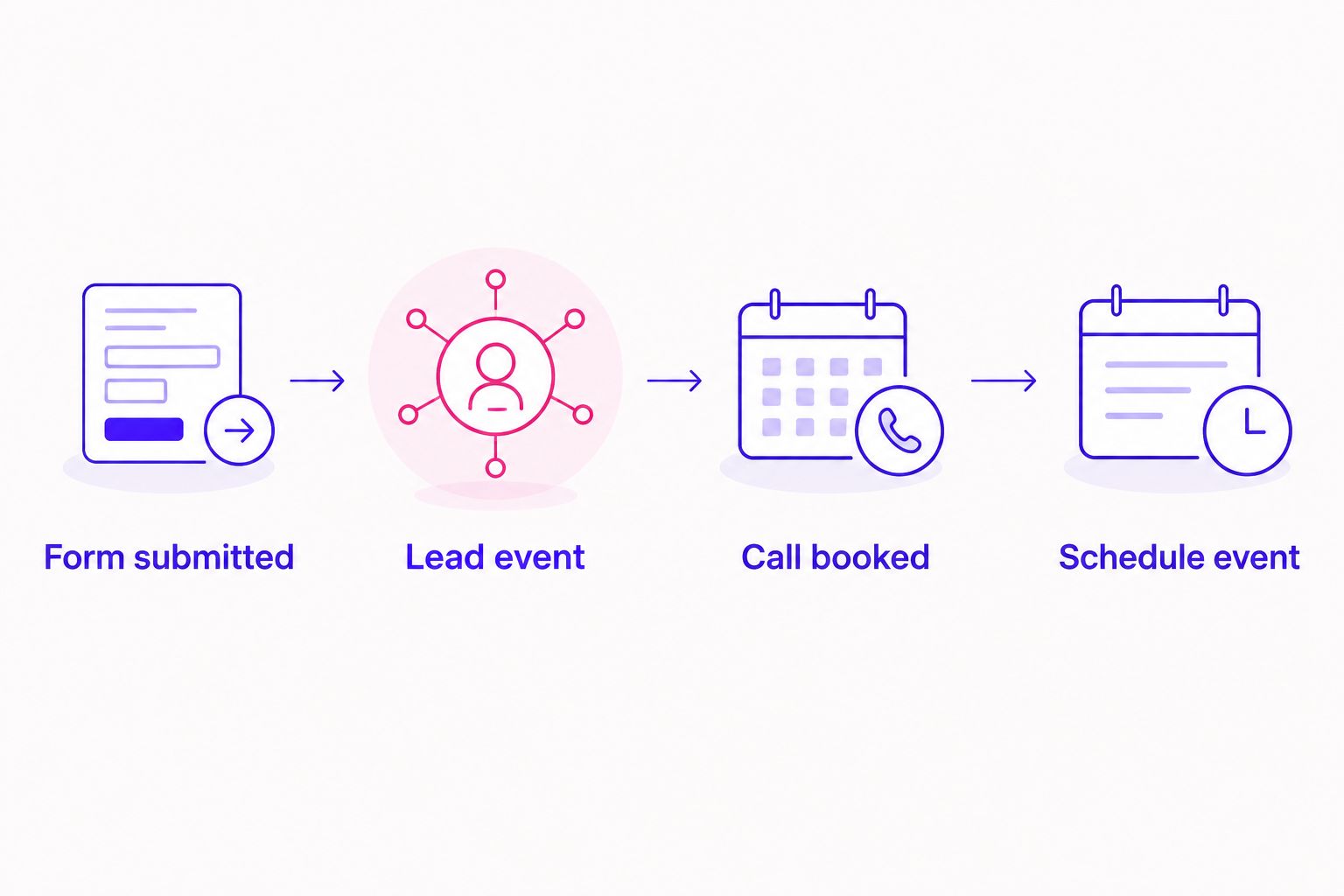
If a contact can book a call without submitting the inquiry form, that is fine. The booking workflow follows the calendar action, not the earlier form path. If several calendars exist, filter the trigger to the one this campaign promotes so an unrelated appointment does not become a campaign milestone.
Troubleshoot the connection
The form submits, but the workflow does not run
Check the sub-account and the Form Submitted trigger first. Confirm that the live funnel uses the selected form, then inspect the contact’s workflow history. A page that looks right can still contain a different form.
The workflow runs, but no event appears in Meta
Check that the workflow is published, the Facebook - Conversion API action completed and the connected account has access to the selected dataset. Then repeat the submission while Test events is open. Fix a failed action in GoHighLevel before changing Meta campaign settings.
One action appears more than once
Look for another workflow or Pixel event sending the same event name. Check re-entry settings, then inspect event IDs if browser and server events both fire. Do not solve duplicate reporting by renaming the same lead action as a purchase.
Lead arrives, but Schedule does not
Inspect the appointment trigger’s calendar and status filters. A submitted form does not satisfy an Appointment Status trigger; make a real test booking and verify that it reaches the status you selected.
Events arrive, but ROAS is unclear
Lead and Schedule describe steps toward an enrollment, not revenue. Return on ad spend, or ROAS, needs actual purchase value attributed to ads. If the checkout sits outside GoHighLevel, identify its purchase-tracking path separately before reporting ROAS from these workflows.
Customize your workflow
Once both events pass their tests, make the 2026 setup useful to the people reviewing campaigns. Give each funnel a consistent form, calendar and workflow naming pattern. Document which action sends Lead, which sends Schedule and which system records enrollment. That small event map prevents a future funnel edit from silently changing what the reports mean.
Then review the gap between submissions and bookings. If form submissions reach GoHighLevel but appointments do not follow, inspect the post-submit experience and scheduling path before assuming your ad creative is the problem. If bookings arrive but enrollments do not, review the offer and sales process against actual enrollment records. Change the part of the funnel the evidence points to.
ZIVA Marketing works with spiritual teachers, healers and coaches on paid social advertising and marketing coaching. For a team handling its own campaigns, the same reporting discipline applies: define the action, test the signal and make decisions from the outcome you actually recorded. For a deeper view of how bookings fit an offer, see the guide to retargeting high-ticket coaching offers.
Connect ads to real outcomes
Explore paid social and marketing coaching for your course or program.
FAQ
How do you connect GoHighLevel to Meta ads for a coaching funnel?
Create a GoHighLevel workflow triggered by a specific funnel action, then send the matching event to your Meta dataset through the Facebook - Conversion API action. Test the action in Meta Events Manager before using the event to assess campaigns.
Which Meta event should a coaching inquiry form send?
A submitted coaching inquiry form can send Lead. Use a separate event for a booked call so form submissions and appointments remain distinct.
Can GoHighLevel track booked discovery calls in Meta?
Yes, a workflow triggered by the relevant appointment status can send Schedule to the selected Meta dataset. Filter the trigger to the correct calendar and booking status, then test it with a booking.
Do I need both Meta Pixel and Conversions API?
You do not need both to describe every action. If the Pixel and Conversions API send the same action, verify that the events have matching names and event IDs so Meta can deduplicate them.
Why does Meta show more leads than GoHighLevel?
First check whether your Meta Lead event fires from more than one source or workflow. Then compare the event definition, selected form, test results and reporting scope before treating the totals as equivalent.
Does a Lead event prove a coaching campaign has positive ROAS?
No. ROAS depends on attributed purchase value and ad spend; a Lead event only records an inquiry. Use enrollment data from the system that records the transaction.
What should I test after changing a GoHighLevel funnel in 2026?
Test the live form submission and, if the funnel books calls, the live appointment path. Confirm each action reaches its intended workflow and appears as the correct event in the intended Meta dataset.
One last thing
Test the path, not just the connection. A successful Meta test event can still describe the wrong form or calendar. In 2026, submit the live inquiry and book the live call yourself before judging campaign performance; ZIVA Marketing’s clearest starting point is always the action a real prospective client takes.