
calendly meta lead ads tracking
Calendly to Meta lead ads: how to track booked discovery calls
Calendly meta lead ads tracking works best when confirmed bookings become separate Meta Schedule events. Connect leads to calls, test matches, and prevent duplicates.
By ZIVA Marketing ·
Instead of matching Meta lead form submissions to Calendly bookings by hand, send each confirmed booking back to Meta so you can see which ads produce discovery calls, not just form fills.
- For calendly meta lead ads tracking, send a confirmed Calendly booking to Meta as a Schedule event.
- Match bookings to form leads with consented contact data; a form submission alone does not prove a call was booked.
- Ziva is best for spiritual teachers and coaches who want paid social advertising and marketing coaching, not another tracking tool.
- Test the booking, cancellation, and duplicate paths before using booked calls to judge ad performance.
Why this matters
A Meta lead ad can collect a form submission before someone opens Calendly. That submission tells you who expressed interest. It does not tell you who chose a discovery call time. If you optimize only for submitted forms, you can miss the gap between initial interest and an actual booking.
For a coach selling an online program, that gap matters. A busy inbox can feel encouraging while your calendar stays quiet. Treat a confirmed Calendly booking as its own event, then compare booked calls with lead volume and ad spend. Neither number alone tells the whole story.
Ziva works with spiritual teachers, healers, coaches, and conscious business leaders on paid social advertising and marketing coaching. If you are still choosing a scheduler, start with the appointment scheduling tools for coaches guide. If Calendly is already part of your process, keep reading: this setup is about connecting a booking to the lead that came before it.
Before you start
- Access: You need permission to manage your Calendly event type, the Meta dataset receiving your ad events, and the automation or server connection between them. Use an integration that can receive a confirmed Calendly booking and send an event through Meta Conversions API.
- A clear booking definition: Pick the Calendly event type used for discovery calls. Record its event type identifier and decide whether rescheduled calls count as new bookings. This guide treats the first confirmed booking as the conversion.
- A consented matching method: Decide which contact details you can send to Meta under your privacy notice and consent process. Meta uses customer information to help match a server event to a person; do not send call notes, health details, spiritual concerns, or other sensitive answers.
The setup trap: A Meta instant form and a Calendly booking are separate actions. An email address entered in the form will not automatically travel into Calendly, and the person can use a different address when booking. Plan how you will join those records before you build the event. If you cannot connect a booking to an ad lead, you can still count bookings, but you cannot reliably credit a specific lead ad for each one.
Set up your Calendly booking trigger
Use a confirmed booking as the trigger, not a click on your scheduling link. A click can end without an appointment; a booking trigger waits until someone completes the scheduling flow.
- In Calendly, find the discovery call event type you use after the Meta lead form. Confirm that its name and booking questions let you distinguish it from other meetings.
- In your automation tool or webhook setup, select the Calendly booking-created event. For a webhook connection, the event name is
invitee.created. Filter the incoming data to the discovery call event type you selected. - Capture the booking identifier, invitee email, event type identifier, and booking time. Keep the booking identifier in your own record so you can recognize retries or reschedules.
- Create a test booking through the same path a lead would follow. Check that your connection receives a confirmed booking, not merely a Calendly page visit.
Expected result: Your connection records the test discovery call once, with an identifier you can use to prevent a duplicate event. If it receives other meeting types, tighten the event type filter before connecting Meta.
Configure the Meta booking event
Meta needs an event that describes what happened. For this workflow, use the standard event name Schedule for a confirmed discovery call. Keep the lead form submission as a separate lead event; replacing it with a booking event would hide the step you need to measure.
- In Meta Events Manager, identify the dataset used by your relevant ad activity. Connect the automation through a supported Conversions API integration or an authenticated server request. Keep credentials in the integration's secure settings, not in a spreadsheet or a public page.
- Map the Calendly confirmation to
event_name=Schedule. Setevent_timefrom the confirmed booking event, not from the future time of the call. The event reports when the booking happened. - Set
action_sourceto reflect where the booking occurred according to Meta's current Conversions API guidance and your actual flow. Do not label a server event as a website action solely to make a report look familiar. - Map only permitted customer information into
user_data. Normalize and hash fields as required by your chosen integration and Meta's specification. If the integration handles hashing, do not hash the same value again in a separate step. - Set
event_idfrom the unique booking identifier. Keep that value stable if the automation retries the same booking.
Expected result: Meta receives a Schedule event for the test booking. That confirms event delivery; it does not yet prove Meta matched the booking to the person who saw or submitted an ad.
Connect the lead to the booking
The critical handoff happens between the lead form and Calendly. You need a dependable way to identify the person across those steps without assuming that every form lead books a call.
- Save each permitted Meta lead form submission in a secure lead record with its form lead identifier, contact details, submission time, and the relevant campaign information available to your connection.
- Send the person to the correct Calendly discovery call flow. If you prefill contact fields, let the person review them; a prefilled email does not guarantee the final booking uses the same address.
- When
invitee.createdarrives, look for a matching lead record using the permitted contact data you collected. Treat a clear match as a linked lead and booking. Flag uncertain matches for review instead of assigning them to the nearest ad. - Store the lead identifier alongside the Calendly booking identifier in your own reporting record. Do not use the form lead identifier as the booking's
event_id: the form submission and the booking are different events.
Expected result: You can open one test lead record and find its corresponding confirmed booking. A booking with no matching lead remains a booking, but it stays unattributed to the lead form in your own reporting.
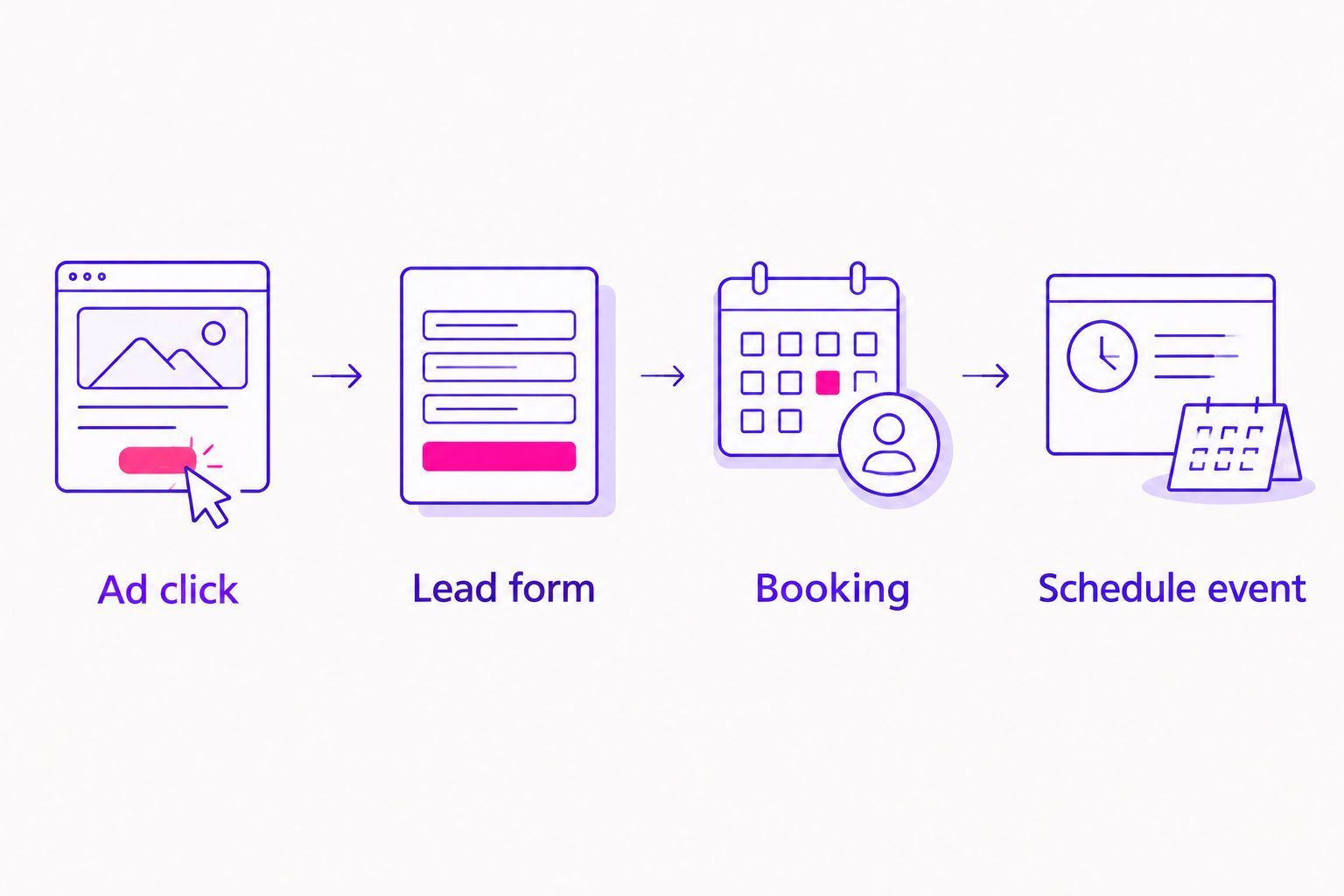
A clean handoff looks like this:
- Ad click: Someone responds to your Meta lead ad.
- Lead form: They submit contact information and receive the scheduling step.
- Booking: Calendly confirms the discovery call.
- Schedule event: Your connection sends the confirmed booking to Meta.
Verify the full path before changing your ads
A successful automation run is not the same as trustworthy ad reporting. Test the path from form to calendar, then inspect the event separately.
- Submit a test lead through a route that represents your real lead ad flow. Record the contact details you used and the lead record created by your connection.
- Book the discovery call with those same permitted contact details. Confirm that the booking reaches your lead record and produces one
Scheduleevent. - Open Test events in Meta Events Manager and inspect the incoming event. Check its event name, timing, and reported source. Follow your integration's test-event instructions so the test appears in the correct dataset.
- Repeat with a booking that has no matching lead form submission. It should not acquire an invented campaign association in your reporting record.
- Trigger or simulate a retry of the same booking in your connection. Your reporting record should retain one booking identifier, not count the retry as another discovery call.
Expected result: You can distinguish a form lead, a confirmed call, an unmatched booking, and a repeated delivery. If you cannot, fix the join or duplicate handling before using booked calls as a performance measure.
The reporting question is specific: Of the people who submitted a lead form, who booked a discovery call? Meta's received event count and your own matched lead-to-booking count answer different questions. Keep both visible when you evaluate a campaign.
Track a booking through a confirmation page instead
A confirmation-page variant works when your Calendly setup can send people to a dedicated page you control after a successful booking. It gives you a browser-side event path rather than relying only on a booking webhook. Check that the redirect is supported for your event type before choosing this route.
- Configure the discovery call event type to redirect after a completed booking to a dedicated confirmation page on your site. Do not send ordinary form submissions or scheduling-link clicks to that page.
- Install the Meta pixel on that page through your site's existing pixel setup and fire
Scheduleonly after the confirmation page loads. Avoid firing it on the scheduling page, where a visitor can leave without booking. - Test a completed booking and a visit to the scheduling page without booking. The completed booking should generate the event; the abandoned visit should not.
- Check whether someone can reload or revisit the confirmation page and trigger another event. If so, use a booking-specific guard or choose the server-side booking trigger as your primary record.
Expected result: The confirmation page produces a browser event after a completed booking. The trade-off: a browser event depends on that page loading and the browser allowing tracking. A confirmed-booking webhook follows Calendly's booking record instead, but still needs careful matching and duplicate handling.
If you use both the page event and a server event for the same booking, send a consistent event_id with both so Meta can identify them as the same action. If your page cannot receive the booking identifier safely, do not assume the events will be deduplicated. Choose one primary event path until you can verify the paired setup.
Troubleshooting booked-call tracking
- Meta shows a lead but no
Scheduleevent. Check that Calendly confirmed the booking, your connection passed the discovery call event type filter, and the event went to the dataset you are inspecting. A form submission alone does not trigger the Calendly booking event. - The event arrives but does not match the form lead. Compare the permitted contact details in the lead record and the Calendly booking. A different email address, missing consented matching data, or a failed record join can break the connection between those steps. Do not force a match from timing alone.
- A booking appears more than once. Check for integration retries, a reschedule that creates a new booking record, or browser and server events firing together. Inspect the booking identifier and
event_idbefore deleting anything; decide how your reporting treats reschedules. - A canceled call remains in the booked-call total. A confirmed booking and a later cancellation are separate facts. Capture Calendly's
invitee.canceledevent and mark the booking canceled in your own record. Decide whether your performance report counts bookings made or calls still scheduled, and label the number accordingly. - The confirmation-page event fires without a booking. Check whether the page is reachable from another route or can be reloaded after a previous booking. Restrict the event to verified confirmations, or switch to the confirmed-booking trigger.
Customize your workflow
Once confirmed bookings are reliable, add the next useful distinctions to your own report: matched versus unmatched bookings, canceled calls, and calls that actually took place. Do not call a booked appointment a completed sales conversation. That difference keeps the story honest when you review campaign results.
Compare lead volume and booked calls for the same campaign and reporting window. Then review cost per booked call using ad spend and bookings you can genuinely attribute to that campaign. Keep unmatched and organic bookings out of the attributed denominator; otherwise the cost figure answers a different question.
Ziva's paid social advertising and marketing coaching is a fit for spiritual teachers who want clearer decisions about the path from an ad to an online course or program. The tracking setup is useful on its own, too: a confirmed booking is a stronger signal than a form submission, but it is not a sale. If you are planning the wider campaign, the related guides below cover the ads and funnel around this handoff.
Clarify your paid social path
Explore paid social advertising and marketing coaching for your online program.
FAQ
How do I track Calendly bookings from Meta lead ads?
Send each confirmed Calendly discovery call booking to Meta as a Schedule event and match it to the consented lead record. Test the form, booking, and event delivery as separate steps.
Does a Meta lead form submission mean someone booked a call?
No. A lead form submission records interest, while a Calendly booking records a confirmed appointment. Keep both events separate so you can see the drop-off between them.
Should I use a Calendly webhook or a confirmation page?
Use a confirmed-booking webhook when you want the event tied to Calendly's booking record. A confirmation-page event is an alternative when your setup supports a redirect and the page fires the event only after a completed booking.
What event should represent a booked discovery call in Meta?
Use the Schedule event for a confirmed discovery call. Keep the initial lead form submission as a separate lead event rather than renaming it as a booking.
Why is my Schedule event not attributed to a Meta ad?
Event delivery does not guarantee ad attribution. Check the dataset, permitted matching data, and whether your lead and Calendly records identify the same person; do not assign an unmatched booking to an ad.
How do I stop duplicate Calendly booking events?
Use a stable booking identifier for the event_id and keep one booking record through integration retries. If you also send a browser event, verify that both paths use the same identifier for the same booking.
Should canceled discovery calls count as bookings?
A canceled call still was booked, but it is no longer scheduled. Record the cancellation separately and label your report as bookings made or calls still scheduled so the number has a clear meaning.
One last thing
In 2026, do not let a cleaner Meta dashboard substitute for a cleaner booking record. Use your confirmed Calendly appointments as the source for what was booked, then use Meta events and matched lead records to understand which ads helped people get there. That distinction makes your next campaign decision easier to trust.