best landing page tools for webinar registration pages
Best landing page tools for webinar registration pages in 2026
Compare the best landing page tools for webinar registration pages. Leadpages leads for dedicated pages; find your fit for courses, email, and testing.
By ZIVA Marketing ·
Leadpages is the best overall landing page tool for a straightforward webinar registration page in 2026; choose Unbounce for page testing, Kajabi for an existing course business, Kit for email-led workshops, or ClickFunnels for a multi-step sales funnel.
- Leadpages leads this shortlist of the best landing page tools for webinar registration pages when you need a dedicated builder.
- Unbounce suits advertisers comparing landing page versions; Kajabi suits course creators already using Kajabi.
- Kit fits email-led workshops; ClickFunnels fits registration journeys that continue through several sales steps.
- Ziva Marketing recommends choosing webinar registration software around the complete attendee journey, not the template alone.
Why your webinar registration tool matters
Your registration page makes a simple promise: share your details, and you will know how to attend. Your tool needs to support that promise beyond the form submission. A contact record alone does not prove that someone can enter your webinar.
For spiritual teachers, healers, and coaches, the page should also feel like a clear invitation. Explain what you will teach, who the session serves, and what happens after registration. You do not need pressure or exaggerated transformation claims.
At Ziva Marketing, we help spiritual teachers and conscious business leaders with paid social advertising and marketing coaching. Our recommendation for webinar registration pages is to choose the simplest tool that supports your registration, reminders, and measurement needs.
What makes the best webinar landing page tool?
Use these criteria before you compare templates:
- Page clarity: You can present the topic, teacher, event details, and registration action without competing distractions.
- Mobile editing: You can check the headline, form, and confirmation experience on a phone.
- Registration handoff: You can establish how a form submission becomes a valid webinar registration.
- Email follow-up: You can deliver joining instructions and reminders through your chosen email system.
- Measurement: You can distinguish a page visit from a completed registration and connect results to your advertising.
- Maintenance: You can update dates, links, and copy without rebuilding the whole journey.
For a 2026 launch, a familiar tool with a working registration journey is a better choice than a new tool selected only for its templates. Treat missing connections as work to complete before launch, not details to resolve after ads start.
Webinar landing page tools at a glance
These tools serve different jobs. The order favors a dedicated registration-page use case first, then more specialized workflows.
| Tool | Best for | Standout capability | Key limitation |
|---|---|---|---|
| Leadpages | A dedicated registration page | Landing page and form building | Webinar delivery needs a separate solution |
| Unbounce | Comparing paid-traffic page variations | Landing page building and split testing | Page testing does not manage the attendee journey |
| Kajabi | Existing Kajabi course businesses | Pages, email, and courses in one platform | Broader platform than a standalone page requires |
| Kit | Email-led workshops | Landing pages connected to email subscribers | Not a webinar broadcasting platform |
| ClickFunnels | Multi-step webinar sales journeys | Connected funnel pages | Adds structure to maintain for a simple event |
Check the current feature set and your account's access before committing. A platform's general capabilities do not confirm that your particular webinar connection or tracking setup is ready.
1. Leadpages: best webinar landing page tool for a dedicated page
Leadpages is a landing page builder with forms and templates. It fits a focused task: publish a registration page without turning your course website into a larger redesign project.
Leadpages is the best default for a coach who wants a dedicated webinar registration page rather than a new course platform. Keep the page focused on the session, then connect the form to the systems that handle attendance and reminders.
Leadpages pros:
- A dedicated environment for building landing pages.
- Templates provide a starting structure for your invitation.
- Forms give visitors a clear registration action.
Leadpages cons:
- Webinar hosting remains a separate responsibility.
- Your form-to-webinar connection still needs verification.
Best for: A teacher or coach who already has email and webinar tools and needs a separate registration page.
Before choosing Leadpages, trace where a submitted email address goes. Confirm whether your setup creates an attendee record or only adds a contact to your email list. Those outcomes are not interchangeable.
Verdict: Buy if you need a dedicated page builder and can connect the full registration journey.
2. Unbounce: best webinar landing page tool for testing paid traffic
Unbounce builds landing pages and supports split testing, which compares different page versions. It suits advertisers who need to evaluate a headline, invitation, or layout rather than simply publish a page.
Start with a clear question. For example, compare a practical teaching promise with a description of the session's broader purpose. Keep the rest of the page consistent so the result has a useful interpretation.
Unbounce pros:
- Landing page creation centers on campaign-specific pages.
- Split testing supports comparisons between page variations.
- Separate campaign pages let you match invitations to different ads.
Unbounce cons:
- Testing requires a defined question and reliable measurement.
- Webinar delivery and reminder coordination remain separate tasks.
Best for: An advertiser with an established registration process who wants to compare page variations.
For your 2026 campaign, begin with 2 page versions and change one meaningful element. Do not declare a winner because a handful of early visitors preferred one version. Registration quality and attendance also belong in the decision.
Verdict: Buy for a planned testing program; hold if your registration journey is not working yet.
3. Kajabi: best webinar landing page tool for existing course businesses
Kajabi combines course delivery, landing pages, and email marketing. It belongs on this shortlist because course creators already using Kajabi should evaluate their existing platform before adding a standalone builder.
Keeping the invitation near your course and email work gives you fewer separate systems to coordinate. It does not automatically solve webinar registration: you still need to confirm how attendees receive access to the live session.
Kajabi pros:
- Landing pages sit alongside course and email tools.
- Existing users can work within a familiar platform.
- The webinar invitation can connect with a broader course-launch journey.
Kajabi cons:
- A standalone registration page does not require a full course platform.
- Live-session access still needs its own confirmed workflow.
Best for: A course creator already using Kajabi for programs and email follow-up.
If you are already comfortable editing Kajabi pages, build a draft there first. Check the mobile layout and complete a registration before considering another builder. Switching platforms should solve a named problem, not simply create a different editing experience.
Verdict: Buy into this approach if Kajabi already supports your business; skip a platform migration for one webinar page.
4. Kit: best webinar landing page tool for email-led workshops
Kit is an email marketing platform with landing pages and forms. It fits workshops where the registration invitation and email relationship belong together.
For a teacher who regularly shares lessons by email, that connection is useful. The important boundary is attendance: becoming an email subscriber is not necessarily the same as becoming a registered webinar attendee.
Kit pros:
- Landing pages connect directly with an email subscriber workflow.
- Forms support a focused invitation without a full website project.
- Email tools support communication beyond the initial sign-up.
Kit cons:
- Kit does not replace a webinar broadcasting platform.
- Subscriber capture still needs a defined route to session access.
Best for: A newsletter-led teacher or coach whose workshop follow-up centers on email.
Write the confirmation email before sending traffic. If you cannot clearly explain where the joining link comes from, finish that part of the setup first. Your reader should never need to guess whether registration worked.
Verdict: Buy for an email-centered invitation; skip if you expect the page tool to broadcast your webinar.
5. ClickFunnels: best webinar landing page tool for multi-step funnels
ClickFunnels builds connected marketing and sales pages. It fits a webinar that sits inside a larger journey, such as registration, confirmation, presentation follow-up, and a program offer.
That structure serves a different need from a standalone invitation. Choose ClickFunnels when the connected steps are part of your actual launch plan, not because every webinar needs a complex funnel.
ClickFunnels pros:
- Connected pages support a staged marketing journey.
- Registration and subsequent offer pages can share a funnel structure.
- The page sequence makes the intended next action explicit.
ClickFunnels cons:
- More pages create more content and links to maintain.
- A funnel builder does not automatically resolve webinar access or reminders.
Best for: A coach with a defined post-webinar sales journey involving several pages.
Map the path before building. If the path ends at a confirmation page and an email reminder, a simpler builder deserves consideration. If your workshop leads into a structured program invitation, evaluate the whole sequence together.
Verdict: Buy for a genuine multi-step funnel; skip unnecessary funnel complexity for a single session.
How the tools rank against the criteria
This 2026 shortlist ranks workflow fit, not measured conversion performance. Leadpages takes the default slot because its core job matches the immediate need: creating a dedicated landing page.
Unbounce earns the testing slot. Kajabi earns the existing-course-business slot. Kit earns the email-led slot, while ClickFunnels earns the connected-sales-journey slot. None of those positions promises better ROAS without evidence from your own campaign.
At Ziva Marketing, we recommend treating the registration page as part of the advertising journey. Our guide to paid social funnels for evergreen webinars explains the broader sequence to consider.
Check the registration journey before sending traffic
Complete 1 full test registration using an email address you can access. Follow the experience as an attendee, not as someone who already knows where every link belongs.
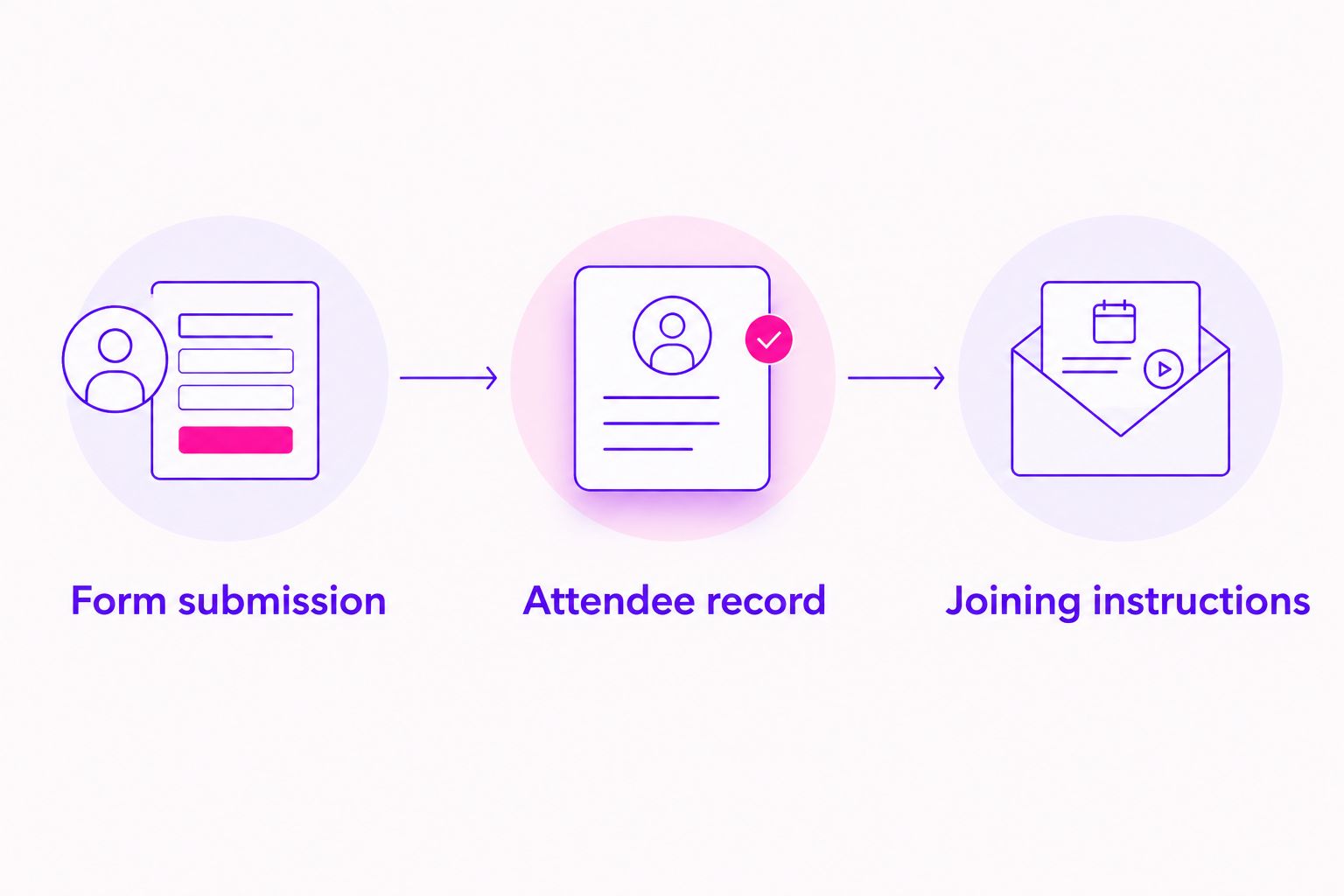
Use these 3 launch checks:
- Form submission: Submit the page on a phone and confirm that the success message appears.
- Attendee record: Confirm that the person exists in the system responsible for webinar attendance.
- Joining instructions: Open the confirmation email and follow the joining instructions through to the correct destination.
Then inspect measurement. A registration event should represent a completed registration, not merely a visit or a button press. Check that refreshing the confirmation page does not create misleading results in your reporting.
For a global audience, state the session's time zone clearly. If your system converts event times for visitors, test that behavior rather than assuming it works. Clear timing is part of the invitation.
Which webinar landing page tool should you choose?
Choose Leadpages if you are undecided and need a dedicated builder. Choose an existing Kajabi setup instead when it already handles your page and follow-up needs.
Choose Unbounce when testing is the specific job. Choose Kit when email is the center of your workshop relationship. Choose ClickFunnels when the webinar belongs inside a planned, multi-page sales journey.
You do not need to rebuild a working business to publish a clear invitation. For your 2026 launch, name the gap first: page creation, registration handoff, email follow-up, or measurement. Select the tool that addresses that gap.
FAQ
What's the best landing page tool for webinar registration pages?
Leadpages is the best default on this shortlist for a dedicated webinar registration page. Unbounce, Kajabi, Kit, and ClickFunnels fit more specific testing, course, email, or funnel workflows.
Is Kajabi better than Leadpages for a course webinar?
Kajabi is the better starting point if you already use it for your courses and email. Leadpages fits creators who want a dedicated page builder without moving their course business.
Can I use Kit to register people for a webinar?
Kit can collect sign-ups through landing pages and forms. You still need to confirm how those sign-ups receive valid access to your webinar platform.
Do I need ClickFunnels for a webinar registration page?
No, a standalone webinar registration page does not require ClickFunnels. ClickFunnels fits a broader journey with connected registration, follow-up, and sales pages.
Which webinar landing page tool is best for split testing?
Unbounce is the testing-focused choice in this shortlist. Define the page element you want to compare and verify registration measurement before evaluating results.
Does a landing page builder also host my live webinar?
A landing page builder does not automatically provide live webinar broadcasting. Confirm separately how your audience registers, receives joining instructions, and enters the session.
What should I test before advertising my webinar?
Test form submission, the attendee record, and joining instructions from beginning to end. Then verify that your reporting records completed registrations rather than page visits or button presses.
One last thing
A confirmation email is a practical test of your entire webinar invitation. It should tell someone that registration succeeded, when to attend, and how to join.
Before your next 2026 launch, read that email on your phone without opening the page editor. If the next step is clear there, you have completed an important part of the experience. Ziva Marketing's recommendation is simple: finish that attendee journey before polishing another template.