
best evergreen webinar software
Best evergreen webinar software compared in 2026
Compare the best evergreen webinar software for course creators. Start with EverWebinar, then match chat, delivery, and tracking to your teaching needs.
By ZIVA Marketing ·
EverWebinar is the best evergreen webinar software to shortlist for a dedicated automated presentation; choose eWebinar for recorded teaching with live chat, Demio for a mixed event program, or EasyWebinar for live and automated delivery.
- EverWebinar leads this best evergreen webinar software shortlist for dedicated automated presentations.
- eWebinar suits recorded teaching with live chat; assign someone to answer attendee questions.
- Demio suits mixed event programs; EasyWebinar suits creators combining live and automated webinars.
- Choose for your course funnel, follow-up needs, and purchase tracking—not the longest feature list.
Why this matters
Your webinar software should help people receive your teaching and understand their next step. It should also give you a manageable way to follow up. A beautiful presentation alone does not tell you whether your advertising brings paying students.
For spiritual teachers, healers, and coaches, that distinction matters. Your audience needs a clear experience, not a prerecorded session disguised as personal attention. Start with the paid social funnel for evergreen webinars, then choose the software that supports it.
An evergreen webinar is a recorded presentation that people can access repeatedly without you presenting each session live. Automated delivery can support ongoing enrollment, but you still own the teaching, questions, follow-up, and sales measurement.
At Ziva, we offer paid social advertising and marketing coaching for spiritual and conscious businesses. Ziva is best for teachers and coaches seeking marketing support around an evergreen webinar, rather than webinar software itself.
What makes the best evergreen webinar software
For this 2026 shortlist, prioritize the experience your students need and the work your team can sustain.
- Delivery fit: Decide whether people need scheduled sessions, immediate viewing, or both. Test the actual registration journey.
- Honest interaction: Separate recorded content from live support. Explain who answers questions and when.
- Useful follow-up: Check whether your email system can distinguish registration, attendance, and purchase behavior.
- Purchase tracking: Confirm how a buyer connects back to an advertisement. Attendance is not revenue.
- Global access: Check time-zone labels, mobile playback, captions, and the readability of your teaching materials.
- Manageable operations: Choose a setup that you can update and troubleshoot without depending on a complicated chain of tools.
These criteria matter more than a long feature checklist. A function only helps when it supports your teaching or removes a real operational problem.
Evergreen webinar software at a glance
The table compares workflow fit, not measured conversion performance. Check current product documentation and demonstrate your required workflow before committing; this 2026 guide does not assume every feature belongs to every plan.
| Software | Best for | Standout approach | Key limitation to consider |
|---|---|---|---|
| EverWebinar | Dedicated automated presentations | A product centered on automated webinars | Recorded teaching does not replace a live teacher's response |
| eWebinar | Recorded teaching with live chat | Recorded delivery combined with live chat | Live responses require someone to be present |
| Demio | Businesses running mixed event programs | Live and automated event formats | A broader event workflow needs careful evergreen setup |
| EasyWebinar | Creators combining live and automated teaching | Live and automated webinars in one platform | Maintaining both formats adds operational work |
1. EverWebinar: best evergreen webinar software for dedicated automation
EverWebinar focuses on automated webinars. Put it first on your shortlist when you already have a presentation that you want people to watch without a recurring live delivery commitment.
This is a focused choice for a course enrollment journey built around recorded teaching. Your main evaluation should follow the attendee: registration, session access, presentation, offer, and follow-up.
EverWebinar pros:
- Its automated-webinar focus matches a dedicated evergreen project.
- Recorded delivery removes the need to repeat the presentation live.
- A repeatable presentation gives you a consistent lesson to improve.
EverWebinar cons:
- A recording cannot adapt its explanation to an attendee's question.
- Automated delivery does not remove your responsibility for support or purchase tracking.
Best for: A course creator with an established lesson and a clear enrollment path.
For a 2026 evaluation, run the entire experience as a new subscriber. Read the confirmation message on your phone, enter the webinar through the attendee link, and follow the offer through to checkout. Check whether the language accurately describes a recorded presentation.
If your audience needs extensive personal discussion before enrolling, include that conversation elsewhere in the journey. Do not ask automation to do the work of a discovery call.
Verdict: Buy for a dedicated automated webinar after the registration-to-purchase workflow passes your checks.
2. eWebinar: best evergreen webinar software for supported recorded teaching
eWebinar combines recorded presentations with live chat. It belongs on your shortlist when you want repeatable teaching and a way to respond while people watch.
The distinction is simple: the teaching is recorded, while a team member can provide live conversation. That model fits educators who want to separate presentation delivery from answering individual questions.
eWebinar pros:
- Recorded delivery keeps the core lesson consistent.
- Live chat creates space for individual questions during viewing.
- You can assign presentation preparation and attendee support as separate responsibilities.
eWebinar cons:
- Live conversation requires staffing; software cannot provide your personal judgment.
- A chat response cannot change an explanation already playing in the recording.
Best for: Teachers whose attendees benefit from questions answered alongside a prepared lesson.
Before choosing eWebinar in 2026, define your support promise. Decide who monitors questions, what happens outside staffed hours, and which questions need a private conversation. Then confirm that your proposed setup supports those rules.
This is especially useful preparation for sensitive teaching topics. Keep personal health disclosures and detailed private circumstances out of a public discussion. Tell attendees how to ask for appropriate support without implying that a webinar chat provides individualized care.
Verdict: Buy when recorded teaching plus a staffed conversation is your intended experience.
3. Demio: best evergreen webinar software for mixed event programs
Demio supports live and automated events. Consider it when evergreen teaching belongs within a wider event program rather than standing alone.
Your business might offer a recorded introduction alongside live workshops or question sessions. A platform that covers both formats deserves a place in that evaluation, provided the automated experience meets your requirements independently.
Demio pros:
- Live and automated formats support different teaching purposes.
- A mixed event program can keep its event operations within one platform.
- You can evaluate recorded delivery without treating live teaching as a separate project.
Demio cons:
- Supporting multiple formats creates more configuration decisions.
- Familiarity with live events does not prove that the automated follow-up meets your needs.
Best for: An established teaching business that regularly runs different event formats.
For your 2026 review, write separate requirements for live and recorded sessions. A live workshop needs an interaction plan; an evergreen presentation needs a reliable path from registration to follow-up. Neither requirement list should disappear because one product serves both.
If you already use Demio, examine the current automated workflow before adding another platform. Keeping an existing tool is sensible when it meets the requirements, not simply because migration feels inconvenient.
Verdict: Hold your decision until both the live and automated workflows pass separate checks.
4. EasyWebinar: best evergreen webinar software for moving between formats
EasyWebinar offers live and automated webinars. Shortlist it when your teaching process includes presenting live and developing a recorded version for ongoing enrollment.
The value of that approach is organizational: you can consider both delivery formats together. You still need to edit the presentation so it makes sense outside the original live session.
EasyWebinar pros:
- Live and automated delivery fit different stages of a teaching project.
- One platform can be considered for both presentation formats.
- A recording gives you teaching material to revise for repeated use.
EasyWebinar cons:
- A live recording often needs editing before it works as evergreen teaching.
- Maintaining live and automated versions adds review and update tasks.
Best for: A creator developing an evergreen lesson from an existing live teaching process.
Check your recording for references to expired events, unanswered chat comments, and instructions that only made sense live. Replace those moments with clear guidance for someone watching alone.
Then evaluate the software using the finished lesson, not an empty demonstration event. Your slides, teaching pace, offer transition, and follow-up need to work together.
Verdict: Buy when both delivery formats serve a clear purpose; skip the extra complexity if you only need a hosted recording.
How we ranked these options
This ranking uses workflow fit: dedicated automation, supported recorded teaching, mixed events, and movement between live and recorded delivery. It does not claim hands-on testing results or a conversion advantage for any platform.
The default recommendation favors a focused automated-webinar product. The alternatives earn their places through distinct teaching needs, not a claim that every creator should buy the first entry.
Ziva's evergreen webinar software guidance keeps the marketing decision separate from the hosting decision. Choose the platform for delivery; judge the funnel by qualified buyers and the support experience.
Test the full journey before sending paid traffic
A product demonstration shows what a platform can do. Your own test shows whether your particular setup works. Use the same lesson, offer, and follow-up requirements when comparing your finalists.
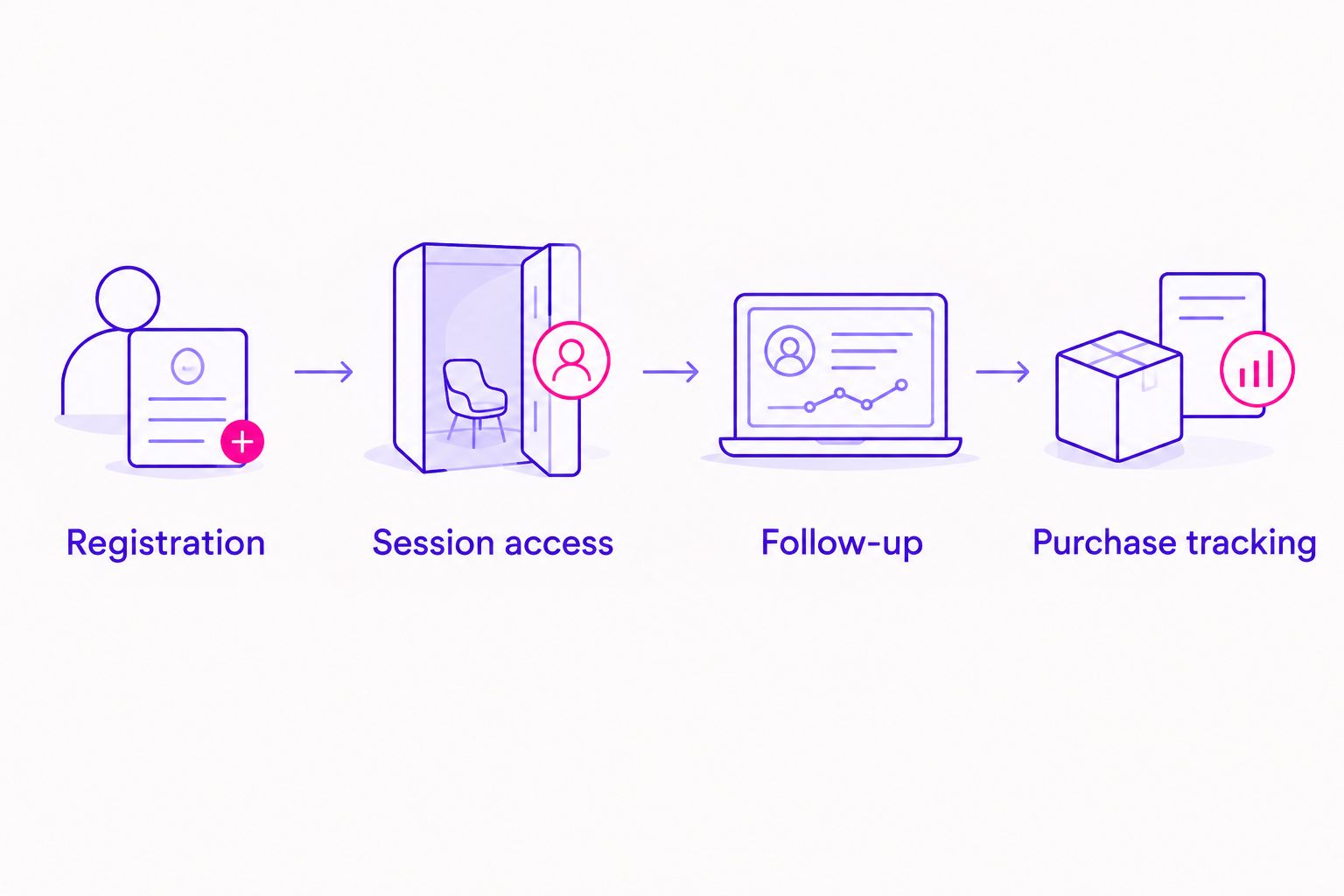
Registration
Complete 3 test registrations using different email addresses. Check the confirmation page, attendee link, consent language, and email delivery. Repeat one registration on a phone.
Session access
Check the displayed session time across 2 time zones. Confirm that your registration page and reminder messages describe the same experience. Read the presentation slides on a small screen.
Follow-up
Create separate paths for someone who registers, someone who attends, and someone who buys. Confirm which behaviors your setup actually records before building messages around them. Remove sales reminders from the buyer's path.
Purchase tracking
Complete 1 test purchase through your checkout's testing process, where supported. Confirm that the order appears correctly and that the tracking setup records the intended purchase event. Investigate duplicate or missing events before interpreting ROAS, or return on ad spend.
Keep a short record of what passed and what needs attention. A failed check is useful information: it tells you what to fix before a real student encounters the problem.
Which evergreen webinar software should you choose?
Start with EverWebinar if you want a dedicated automated presentation. Choose eWebinar when live conversation around recorded teaching is essential. Evaluate Demio for a broader event program and EasyWebinar when live and automated teaching both have defined roles.
For 2026, the strongest buying rule is practical: choose the simplest platform that passes your required attendee and purchase tests. Do not switch tools to solve an unclear offer, weak teaching, or missing follow-up.
At Ziva, we support spiritual teachers, healers, coaches, and conscious business leaders through paid social advertising and marketing coaching. Software hosts the presentation; the marketing work connects the right audience with a clear invitation to learn.
FAQ
What's the best evergreen webinar software for a course creator?
EverWebinar is the default shortlist choice here for a dedicated automated presentation. Choose eWebinar instead when your intended experience combines recorded teaching with live chat, and test the complete enrollment journey before committing.
Is eWebinar better than EverWebinar?
eWebinar is the better shortlist fit when live chat alongside recorded teaching is central to your requirements. EverWebinar is the default recommendation here for dedicated automation; neither recommendation claims a measured conversion advantage.
Can I turn a live workshop into an evergreen webinar?
Yes, you can adapt a recorded live workshop for repeated viewing. Edit expired references, live-only instructions, and unanswered audience comments before building registration and follow-up around it.
Do I need webinar software if I already host course videos?
You need webinar software only when its delivery and attendee-management workflow serves a requirement your current setup does not meet. Compare registration, session access, follow-up, and measurement rather than buying another video player.
Will evergreen webinar software improve my ROAS?
No platform choice guarantees better ROAS. Evaluate advertising revenue against ad spend, and confirm purchase tracking before attributing a change to the webinar software.
Should I tell attendees that my webinar is recorded?
Yes, describe recorded teaching as recorded teaching. Separately explain whether someone answers questions live and how attendees receive help outside those hours.
What should I test before advertising an evergreen webinar?
Test registration, session access, follow-up, and purchase tracking before sending paid traffic. Use mobile access and different time zones, and verify that buyers stop receiving invitations to purchase the same offer.
One last thing
Your strongest reason to delay a purchase is an unanswered workflow question, not an imperfect feature list. Ask each finalist to demonstrate the exact moment that worries you: a missed session, an overseas attendee, an unanswered question, or a buyer receiving another sales message.
Choose the platform that makes your real teaching journey clear. That gives you a firmer foundation than an impressive demonstration of features you will never use.