
best event ticketing platforms for virtual summits
Best event ticketing platforms for virtual summits in 2026
Compare the best event ticketing platforms for virtual summits. Choose HeySummit for summit-first planning, or match your existing event setup.
By ZIVA Marketing ·
HeySummit is the best overall starting point for a speaker-led virtual summit in 2026; Eventbrite suits standalone ticketing, Ticket Tailor suits an existing event setup, and Zoom Events suits a live, multi-session program.
- Among the best event ticketing platforms for virtual summits, HeySummit is the default shortlist for speaker-led events.
- Choose Eventbrite when ticket registration matters more than managing the full summit experience.
- Choose Ticket Tailor when you already have a website, email system, and session delivery tools.
- Choose Zoom Events when live sessions are the center of your event.
- ZIVA Marketing provides paid social advertising and marketing coaching, not event ticketing software.
Why this matters
Your ticketing platform is the front door to your summit. Your attendee needs to understand the offer, register, receive confirmation, and find the right session without asking you for help.
For a spiritual teacher, healer, or coach, that experience also sets the tone for the relationship. Clear instructions support the welcoming experience you want to create. Confusing access messages add work for both your attendees and your team.
At ZIVA Marketing, we help spiritual teachers and conscious business leaders grow their courses and programs through paid social advertising and marketing coaching. Pair this platform decision with your virtual summit launch advertising plan, so registration and promotion support the same goal.
Choose the platform for the attendee journey you need, not the longest feature list.
What makes the best virtual summit ticketing platform?
Use these criteria before comparing individual tools. A platform that handles payment is not automatically a complete summit system.
- Registration clarity: Your audience should understand what registration includes, when the event happens, and how to attend.
- Session organization: Your setup needs to communicate speakers, session times, and access instructions clearly.
- Delivery fit: Decide whether the platform will manage the event experience or simply hand attendees to another tool.
- Email handoff: Confirm how registration details reach your email system and how attendees receive reminders.
- Measurement: Check whether you can connect registrations and purchases to your advertising reports.
- Team workload: Identify who will handle access questions, schedule changes, cancellations, and attendee support.
For your 2026 shortlist, separate essential requirements from nice additions. Start with the event you are actually delivering, not the event you might create someday.
Virtual summit ticketing platforms at a glance
These recommendations distinguish summit management, ticketing, and live delivery. The categories overlap, but they solve different problems.
| Platform | Best for | Standout focus | Key limitation |
|---|---|---|---|
| HeySummit | Speaker-led summits | Summit organization around speakers and sessions | Confirm the delivery and integration setup your event requires |
| Eventbrite | Standalone event registration | Event listings and ticket registration | Ticketing alone does not organize your full learning experience |
| Ticket Tailor | Organizers with an existing event setup | Dedicated ticket sales and registration | You still need a session delivery and follow-up workflow |
| Zoom Events | Live, multi-session programs | Event management connected to Zoom sessions | Your broader course and marketing journey still needs planning |
Treat this table as a shortlist, not a substitute for checking current product documentation. Before committing in 2026, confirm the exact capabilities included in the configuration you intend to use.
1. HeySummit: best for speaker-led virtual summits
HeySummit is built around organizing online summits with speakers and sessions. It belongs at the top of your shortlist when the event itself needs a dedicated structure, rather than a ticket page attached to a collection of meeting links.
Best for: Organizers building a speaker-led summit with a structured program.
A summit has several moving parts: speaker information, session descriptions, registration, access, and communication. HeySummit's summit-specific focus makes it a relevant starting point when those parts need to work together.
That does not mean every event requirement is automatically covered. Check how your chosen session delivery tools, email system, and payment workflow connect before you build the public registration page.
HeySummit pros:
- Its summit focus matches a speaker-and-session event format.
- It gives you a dedicated event layer rather than asking your main website to carry the entire summit.
- It is a logical shortlist choice when coordinating the program matters as much as collecting registrations.
HeySummit cons:
- A dedicated summit platform adds another system for your team to learn and maintain.
- You must verify the integrations and access rules your particular event needs.
Ask for a demonstration of your actual attendee journey. Include a registration, an access email, a session visit, and the transition into any replay experience you plan to offer.
Verdict: Buy for a summit-first setup after the complete attendee journey passes your checks.
2. Eventbrite: best for standalone event registration
Eventbrite provides event listings and ticket registration. It is a practical shortlist choice when you need a recognizable event registration destination and already know where your sessions will take place.
Best for: Organizers who need ticketing rather than a full summit environment.
Keep the distinction clear: an event listing explains and sells admission; your delivery setup determines what happens after registration. If you choose Eventbrite, map the handoff to your session platform and email system before opening registration.
For a simple summit, that separation can be useful. For a complex learning experience, it means you must deliberately connect the pieces.
Eventbrite pros:
- Its core purpose matches event registration and ticketing.
- You can assess the registration workflow separately from session delivery.
- It suits a setup where the event destination already exists elsewhere.
Eventbrite cons:
- An event registration page is not a substitute for a complete summit program and access experience.
- Your team must coordinate messages across the ticketing and delivery systems.
Give special attention to your confirmation message. An attendee should know whether that message contains the session access details or whether another message will follow.
Verdict: Buy when registration is the missing piece; skip when you need ticketing to manage the entire summit.
3. Ticket Tailor: best for an existing event setup
Ticket Tailor is a dedicated event ticketing platform. It belongs on your shortlist when you already have a website, an email system, and a clear plan for delivering the summit sessions.
Best for: Organizers who want a ticketing layer without rebuilding their event setup.
This approach lets you evaluate ticket sales as a separate function. Your website explains the event, your delivery tools host the sessions, and your ticketing workflow handles registration.
The trade-off is ownership. Someone on your team needs to understand how attendee information moves between those systems and what happens when a connection fails.
Ticket Tailor pros:
- Its dedicated ticketing focus fits an event with delivery already arranged.
- It supports a modular approach rather than requiring your entire business to move into an event platform.
- It gives you a clear boundary between registration and session hosting.
Ticket Tailor cons:
- Ticketing alone does not provide the full summit learning journey.
- Separate systems require deliberate testing, documentation, and support ownership.
Before choosing Ticket Tailor, write down every handoff. Include registration confirmation, reminder emails, session access, and any change to an attendee's registration.
Verdict: Buy when your existing setup works and ticketing is the specific gap.
4. Zoom Events: best for live, multi-session programs
Zoom Events connects event management with Zoom-based sessions. It is a relevant shortlist choice when live delivery shapes the program and you want to assess registration alongside the event environment.
Best for: Organizers whose summit revolves around live Zoom sessions.
Start with the experience your audience needs during the event. Consider how attendees find sessions, how speakers enter, and who handles live support.
Then examine the journey outside the live event. Your invitation emails, advertising measurement, replay plans, and follow-up offer still need clear ownership.
Zoom Events pros:
- Its connection to Zoom sessions makes it relevant for live-first events.
- You can evaluate event organization and session delivery together.
- It is a sensible shortlist option when your production plan already centers on Zoom.
Zoom Events cons:
- A live event environment does not replace your broader course marketing system.
- Your team still needs to verify attendee access, speaker preparation, and post-event communication.
Check current event-format and account requirements directly with Zoom. Do not assume an existing meeting setup includes everything your summit needs.
Verdict: Buy for a live-first program after confirming the required event configuration.
How to check your platform before you commit
A useful evaluation follows the attendee, not the settings menu. For a 2026 launch, test the complete path while changes are still easy to make.
Use these stages in order:
- Registration: Open the event page on your phone and complete the intended registration process.
- Confirmation: Read the confirmation as someone who has never attended your event before.
- Session access: Follow the instructions and reach the correct session destination.
- Follow-up: Check what the attendee receives after the session and where the next action leads.
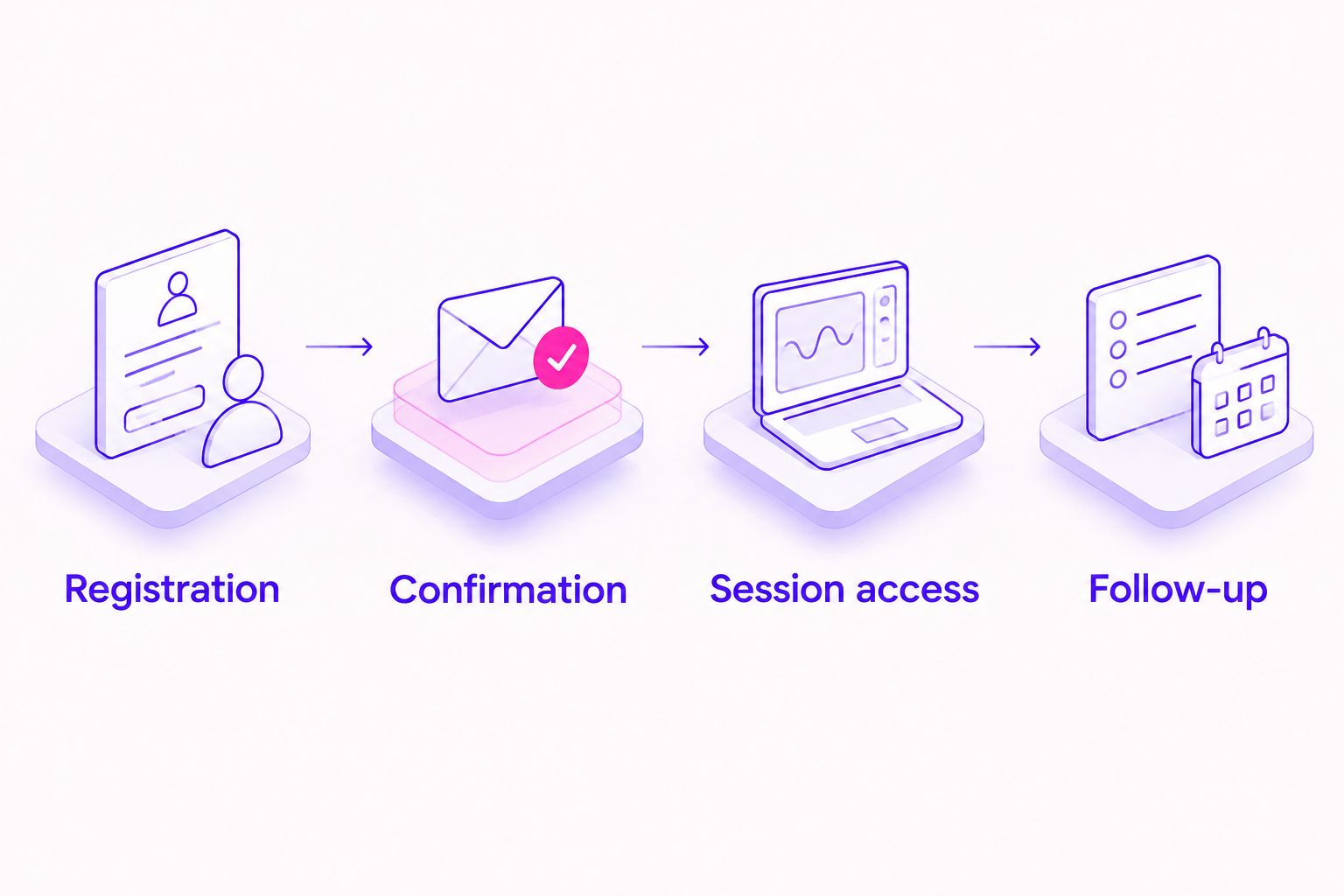
Use 2 email addresses for this check: one associated with your event team and one that has never registered before. The second address helps you review the experience without relying on existing account access.
Run 1 complete registration journey on a phone before approving the setup. Then repeat it on a computer and check any alternative ticket or access route you intend to offer.
Document 3 support answers before registration opens: where access details arrive, how attendees find sessions, and whom they contact for help. These are practical preparation steps, not performance benchmarks.
Measure registration and revenue separately
A completed registration and a completed purchase represent different actions. Keep them separate in your reports, especially when a summit leads into a coaching program or online course.
If you use paid advertising, decide which action the campaign is intended to generate. Then check whether your reporting records that action correctly.
ROAS means return on ad spend: revenue attributed to advertising divided by advertising spend. A registration count alone cannot tell you ROAS, and a summit ticket purchase is not the same as a later course purchase.
Your 2026 measurement plan should explain which revenue belongs to which offer. Our guide to tracking ROAS across currencies addresses another important distinction when your audience buys internationally.
Keep attendee support records separate from advertising reports, but make both understandable to the people who use them. Clear measurement helps you improve the next event without guessing what happened.
How the platforms are ranked
This ranking prioritizes event-format fit, registration clarity, delivery responsibilities, email handoffs, and measurement requirements. It is a decision guide, not a claim that every platform has been tested against an identical summit.
HeySummit leads for summit-specific organization. Eventbrite and Ticket Tailor suit distinct ticketing needs, while Zoom Events belongs on the live-delivery shortlist.
ZIVA Marketing is not included as a ticketing option because we provide paid social advertising and marketing coaching. ZIVA Marketing is best for spiritual teachers and conscious business leaders seeking marketing support for their online courses and programs.
Which virtual summit ticketing platform should you choose?
Start with HeySummit if you are undecided and building a speaker-led summit. Its summit focus makes it the clearest first evaluation for that format.
Choose Eventbrite when you need standalone registration. Choose Ticket Tailor when you want ticketing to fit an existing setup. Choose Zoom Events when live sessions define the event experience.
For your 2026 decision, require a working attendee journey before committing. A clear route from registration to attendance matters more than a feature you never use.
FAQ
What's the best event ticketing platform for a virtual summit?
HeySummit is the default shortlist for a speaker-led virtual summit. Choose a different platform when standalone ticketing or live Zoom-based delivery is your main requirement.
Is Eventbrite enough to run a virtual summit?
Eventbrite handles event listings and ticket registration, but you still need a clear session delivery plan. Confirm how attendees receive access instructions and reminders.
Is Ticket Tailor a good choice if I already have a website?
Ticket Tailor is a relevant choice when you need dedicated ticketing alongside an existing event setup. Check the handoff between registration, your email system, and session delivery.
Should I use Zoom Events for a live summit?
Zoom Events belongs on your shortlist when the program centers on live Zoom sessions. Verify the current event configuration and account requirements before committing.
Do I need a separate email system for a virtual summit?
You need a reliable way to send confirmations, reminders, and follow-up messages. Whether that requires a separate email system depends on your chosen platform and communication requirements.
How do I know whether summit advertising is working?
Measure the action your campaign is intended to generate, such as registrations or purchases. Calculate ROAS from attributed revenue and advertising spend rather than registration totals alone.
Does ZIVA Marketing provide virtual summit ticketing?
ZIVA Marketing provides paid social advertising and marketing coaching, not ticketing software. We help spiritual teachers, healers, coaches, and conscious business leaders grow their online courses and programs.
One last thing
Ask someone unfamiliar with your summit to register without your guidance. Watch where they hesitate, and revise the instructions at that exact point.
Your registration journey is ready when the attendee can follow it without borrowing your knowledge of the event.