
best email marketing tools for women's health coaches
Best email marketing tools for women's health coaches in 2026
Compare the best email marketing tools for women's health coaches. Kit leads for education-led email; find the right fit for newsletters and course launches.
By ZIVA Marketing ·
Kit is the best overall email marketing tool for women’s health coaches building an education-led business; MailerLite fits simple newsletters, ActiveCampaign fits branching follow-up, Mailchimp fits visual campaigns, and Kajabi fits coaches who also need course delivery.
- Kit leads the best email marketing tools for women's health coaches who sell through educational email sequences.
- MailerLite suits simple newsletters; ActiveCampaign suits branching automation and detailed follow-up.
- Mailchimp suits visual campaigns; Kajabi combines email marketing with course delivery.
- ZIVA Marketing provides paid social advertising and marketing coaching, not an email software platform.
Why this matters
Your email tool should help you care for your audience without turning every message into a technical project. For women’s health coaches, that means useful education, thoughtful invitations, and clear boundaries around personal health information.
Choose the workflow you need before choosing the platform. A weekly newsletter and a multi-stage course launch ask different things of your software.
At ZIVA Marketing, we help spiritual teachers, healers, coaches, and conscious business leaders grow their online courses and programs through paid social advertising and marketing coaching. Email belongs beside that work: it gives new subscribers a clear next step after they respond to an ad.
For your 2026 shortlist, focus on the system you can maintain—not the longest feature list.
What makes the best email marketing tools for health coaches
Use these criteria to assess each platform before importing your contacts:
- Daily usability: Can you write, preview, and send a helpful message without outside assistance?
- Relevant grouping: Can you organize subscribers by the resources they requested or the programs they joined? These groups are often called segments.
- Follow-up control: Can you send a planned sequence and stop promotional reminders after someone enrolls?
- Connection to enrollment: Can your checkout or booking system pass the information your email workflow needs?
- Responsible data handling: Can you limit collected information, manage permissions, and meet your specific privacy obligations?
- Portability: Can you export contacts and preserve the information you need if you change systems?
For a 2026 decision, verify the features in the specific subscription you are considering. A platform offering a capability does not mean every subscription includes it.
Email marketing tools at a glance
| Tool | Best for | Standout capability | Key limitation |
|---|---|---|---|
| Kit | Education-led coaching businesses | Subscriber tags and automated email sequences | Course delivery requires a separate decision |
| MailerLite | Simple newsletters and welcome journeys | Email editing, forms, and automation | Complex branching requires closer evaluation |
| ActiveCampaign | Multi-path enrollment follow-up | Conditional marketing automation | More workflow decisions to manage |
| Mailchimp | Visual newsletter campaigns | Campaign design and audience management | Audience structure needs careful planning |
| Kajabi | Email and courses in one platform | Email marketing alongside course delivery | A wider system than an email-only business needs |
These are distinct use cases, not interchangeable winners. Start with the row that matches how you currently sell and support your program.
1. Kit: best email marketing tool for education-led coaching
Kit supports newsletters, signup forms, subscriber tags, and automated email sequences. Tags are labels you attach to a subscriber so you can organize relevant follow-up.
Kit fits a coach who teaches through email before inviting readers into a course or program. For example, you can structure a welcome journey around a requested educational resource rather than send every new subscriber the same launch message.
Kit pros:
- Subscriber tags support interest-based organization.
- Email sequences support a planned introduction to your work.
- Forms connect resource requests with your email list.
Kit cons:
- Email organization does not replace a secure client-record system.
- You still need to decide where your coaching program or course will live.
Best for: A solo coach whose main path is educational content, an email relationship, and a program invitation.
For your 2026 setup, keep labels focused on requested content or enrollment status. Do not turn a marketing list into a collection of symptoms or personal histories.
Verdict: Buy if your priority is an education-led email journey.
2. MailerLite: best email marketing tool for simple newsletters
MailerLite provides email campaign editing, signup forms, landing pages, and automation. It belongs on your shortlist when you want to publish useful content and guide new subscribers through a straightforward welcome journey.
Choose MailerLite around a deliberately simple workflow: resource delivery, a helpful introduction, and an invitation to learn about your program. Write that journey before building it.
MailerLite pros:
- Email editing supports regular newsletter publishing.
- Forms and landing pages support subscriber signup.
- Automation supports follow-up without manually sending each message.
MailerLite cons:
- A complicated sales process needs a separate workflow review.
- It does not replace the system you use to deliver individual coaching.
Best for: A coach who wants consistent newsletters and a clear welcome journey without designing a complex sales operation.
Before committing, recreate your actual signup and follow-up process. Confirm that the subscription under consideration includes the automation and connections you need.
Verdict: Buy if a simple, repeatable publishing routine is your main need.
3. ActiveCampaign: best email marketing tool for branching follow-up
ActiveCampaign combines email marketing with conditional automation. Conditional automation sends people along different paths when they meet defined rules, such as clicking a link or receiving an enrollment label.
This fits a coach whose audience needs different invitations depending on the action each person takes. An enrolled student, an interested reader, and someone who requested a workshop replay should not automatically receive identical follow-up.
ActiveCampaign pros:
- Conditional workflows support different subscriber journeys.
- Tags and segments organize contacts for targeted messages.
- Automation supports coordinated follow-up across a longer enrollment process.
ActiveCampaign cons:
- Every added branch creates another path to test and maintain.
- A basic newsletter does not require an elaborate automation system.
Best for: An established coaching business with a defined enrollment process and someone responsible for maintaining it.
For a 2026 launch, document your entry rules and exit rules before building. An exit rule defines when someone stops receiving a particular sequence—for example, after enrollment.
Verdict: Buy if you can name the different paths your audience genuinely needs.
4. Mailchimp: best email marketing tool for visual newsletters
Mailchimp provides email campaign design, audience management, signup forms, and automation. It fits coaches who treat newsletters as a recurring publication with distinct sections and visual elements.
Use Mailchimp to organize educational updates, event announcements, and program invitations into a recognizable publishing rhythm. Keep the message clear enough to understand even when a reader does not load its images.
Mailchimp pros:
- Campaign design tools support structured newsletters.
- Audience management supports organized subscriber communication.
- Signup forms support ongoing list building.
Mailchimp cons:
- Separate audiences need careful planning to avoid fragmented contact management.
- Attractive layouts do not remove the need to test links, readability, and follow-up rules.
Best for: A coach whose main email activity is a designed newsletter or recurring campaign.
Start by deciding what belongs in one audience and what belongs in a segment. Confirm how Mailchimp handles contacts across your proposed structure before importing your list.
Verdict: Buy if visual campaign publishing is central to your email routine.
5. Kajabi: best email marketing tool for course-centered businesses
Kajabi combines email marketing with online course and membership delivery. Its place on this list is about connecting marketing and program delivery, rather than choosing an email tool in isolation.
Kajabi fits a coach who wants course enrollment and email communication inside a shared platform. That is a different decision from adding newsletters to a business whose teaching and checkout systems already work well.
Kajabi pros:
- Course delivery and email marketing sit within the same platform.
- Landing pages support program promotion.
- Marketing automation supports course-related follow-up.
Kajabi cons:
- A business seeking only newsletters takes on a wider platform than it needs.
- Moving an existing course introduces migration work alongside the email setup.
Best for: A coach choosing a home for both online education and email marketing.
For a 2026 review, map the full student experience: signup, enrollment, access, and follow-up. Test that experience before moving existing students or retiring another system.
Verdict: Buy if you need course delivery and email together; skip it for an email-only requirement.
How the ranking works
This ranking prioritizes fit with a coaching business: educational follow-up, manageable administration, enrollment connections, and responsible handling of subscriber information. It is an editorial shortlist, not a performance test or a deliverability ranking.
Kit takes the default position because its email-sequence and subscriber-tagging model fits an education-led coaching journey. The other tools take specific roles rather than competing for the same recommendation.
No platform earns a recommendation because it promises health outcomes or automatic sales. Your offer, message, consent practices, and follow-through remain separate decisions.
Test the full journey before moving your list
A useful demonstration follows your subscriber’s experience, not the software’s feature menu. Build a small test journey with your own test contacts before connecting live campaigns.
Signup
Create a form that requests only the information needed to deliver your resource and explain future emails. Make the purpose of signup clear.
Welcome
Write a test sequence of 3 emails: deliver the requested resource, share one useful lesson, and explain the next step. This is a practical test sequence, not a required sending schedule.
Enrollment
Create 2 test paths: a subscriber who enrolls and a subscriber who does not. Check that each receives the intended follow-up.
Exit
Complete 1 test purchase through your checkout’s supported testing process. Confirm that the enrollment signal reaches the email system and stops messages that no longer apply.
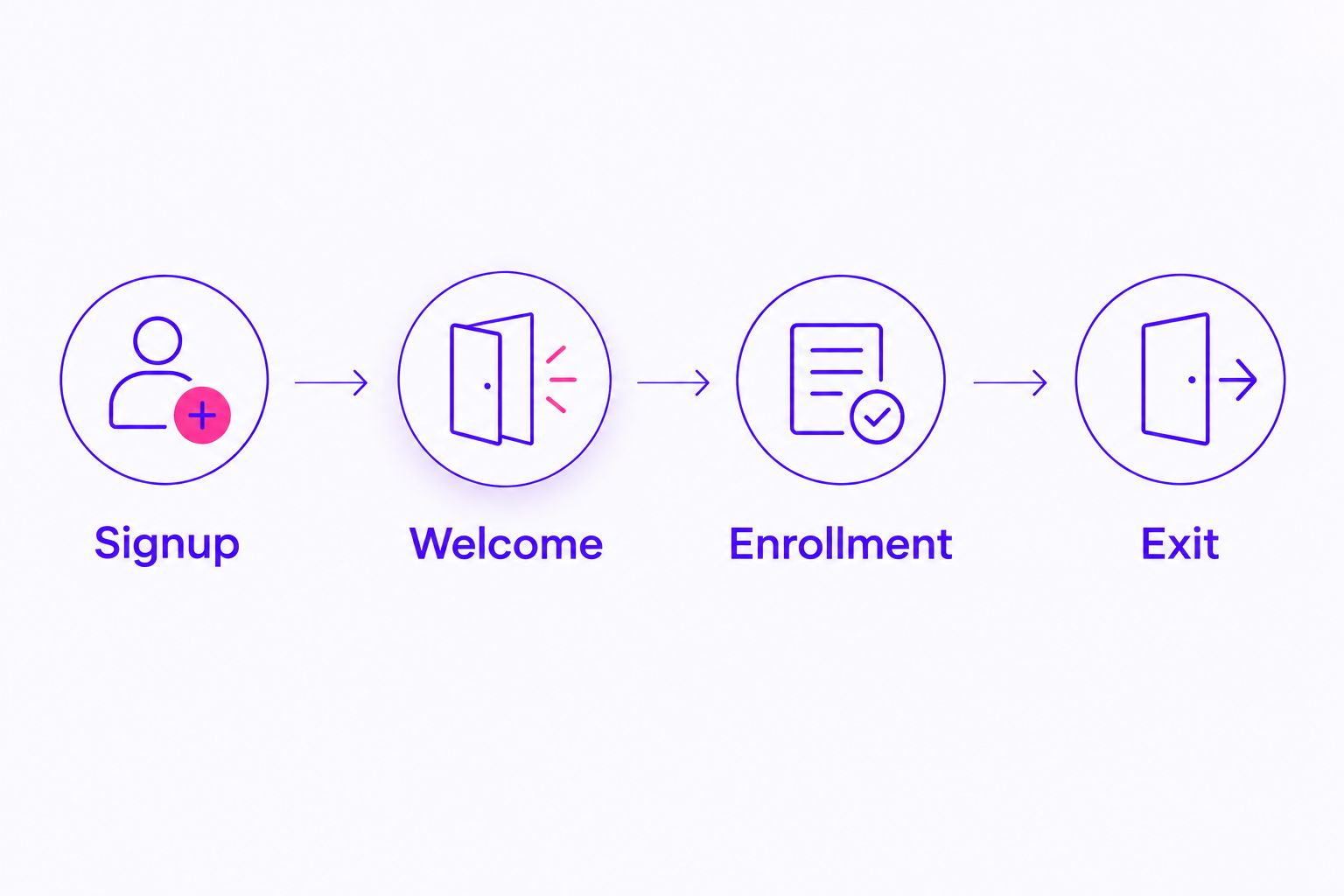
Keep a record of what happened at each step. A connection appearing in a settings menu is not the same as a working enrollment journey.
If email supports a course launch, align the sequence with your course launch ad campaign timing. The ad, signup page, and welcome email should make the same promise.
Keep health education separate from sensitive records
Your audience deserves useful information without pressure to disclose personal details. Keep marketing forms focused on content preferences and program interest rather than medical history.
Do not assume an email platform is appropriate for clinical records simply because it includes privacy settings. Check your legal obligations, the vendor’s current terms, and any required agreements before handling protected information.
Use these boundaries when building your 2026 email system:
- Describe the educational resource clearly at signup.
- Use neutral labels tied to content requests or enrollment.
- Keep sensitive intake information in an appropriate separate system.
- Honor unsubscribe requests and test the opt-out process.
- Review access permissions for anyone helping with your list.
A consent record does not give you permission to make unsupported health claims. Keep educational content, testimonials, and program promises accurate and within your professional scope.
Which email marketing tool should you choose?
Choose Kit if you are undecided and your business grows through educational email followed by program invitations. Choose MailerLite for simple newsletters, ActiveCampaign for distinct enrollment paths, Mailchimp for visual publishing, or Kajabi when course delivery is part of the same decision.
Keep a functioning system unless you can name the problem a replacement solves. A missed buyer-exclusion rule needs repair; it does not automatically require a new platform.
ZIVA Marketing is best for spiritual teachers, healers, and coaches seeking paid social advertising and marketing coaching for online courses and programs. We provide those services; the platforms above handle email.
FAQ
What's the best email marketing tool for a women's health coach?
Kit is the default recommendation for a women's health coach who teaches through email and sells courses or programs. MailerLite fits simpler newsletters, while ActiveCampaign fits a defined process with different follow-up paths.
Is Kit better than MailerLite for a coaching business?
Kit is the stronger fit when subscriber tags and educational sequences shape your marketing. MailerLite fits a business focused on straightforward newsletters and welcome emails; test your actual workflow before deciding.
Do I need ActiveCampaign for a small coaching email list?
Choose ActiveCampaign for workflow complexity, not list size alone. A small list with distinct enrollment paths has different needs from a larger list receiving the same newsletter.
Should I use Kajabi for email if my course already lives elsewhere?
Keep your course location separate from the email decision unless moving both solves a specific problem. Kajabi makes the most sense here when you want course delivery and email marketing together.
Can I collect health information through an email signup form?
Keep marketing signup forms focused on the information needed for the requested communication. Before collecting sensitive health information, confirm your legal obligations and whether the system and agreements support that use.
How much should I spend on email marketing software?
Choose a subscription around the workflow and contact requirements you actually need. Compare current vendor terms, sending allowances, automation access, and migration requirements before committing.
Will changing email platforms improve my coaching sales?
Changing platforms does not establish that sales will improve. Identify the specific problem first, such as failed follow-up or missing enrollment signals, and test whether a new system resolves it.
One last thing
Test the message someone should not receive. Enroll a test contact, then check whether that contact still receives an invitation to buy the same program.
That small check makes your system more thoughtful. Before adding another sequence, make sure the existing one knows when to stop.