
best application form tools for high-ticket coaching
Best application form tools for high-ticket coaching in 2026
Typeform wins overall among the best application form tools for high-ticket coaching in 2026 — see how ScoreApp, Paperform, and Jotform compare too.
By ZIVA Marketing ·
Typeform is the best application form tool for high-ticket coaching in 2026, ScoreApp wins for pre-qualifying leads before the sales call, Paperform wins for combining the application with a deposit step, and Google Forms wins as the honest budget pick for coaches testing their first funnel.
- Typeform wins overall for high-ticket coaching in 2026 — conversational, on-brand, and built for conditional logic.
- ScoreApp wins for pre-qualification — it scores each respondent before the call so your team stops chasing the wrong leads.
- Paperform wins when you want the application and a deposit or booking step in one flow.
- Google Forms is the honest budget pick — plain, free-tier friendly, and fine for your first batch of applicants.
- Jotform and Airtable Forms both fit teams that need heavier logic or a shared pipeline view.
Why this matters
A high-ticket coaching application is the last checkpoint before someone lands on your calendar. If the form is clunky, qualified people abandon it. If it's too loose, your sales team spends 2026 booking calls with people who were never going to buy.
We see this constantly at ZIVA when we build quiz funnels for coaching lead generation: the ad gets the click, but the application form decides whether that click turns into a booked call or a wasted lead. The tool you pick controls how much friction sits between "interested" and "qualified."
This matters even more for paid social campaigns running high-ticket coaching programs, because every unqualified application that slips through inflates your real cost per acquisition — even when the ad platform reports a cheap cost per lead.
What makes the best application form tool for high-ticket coaching
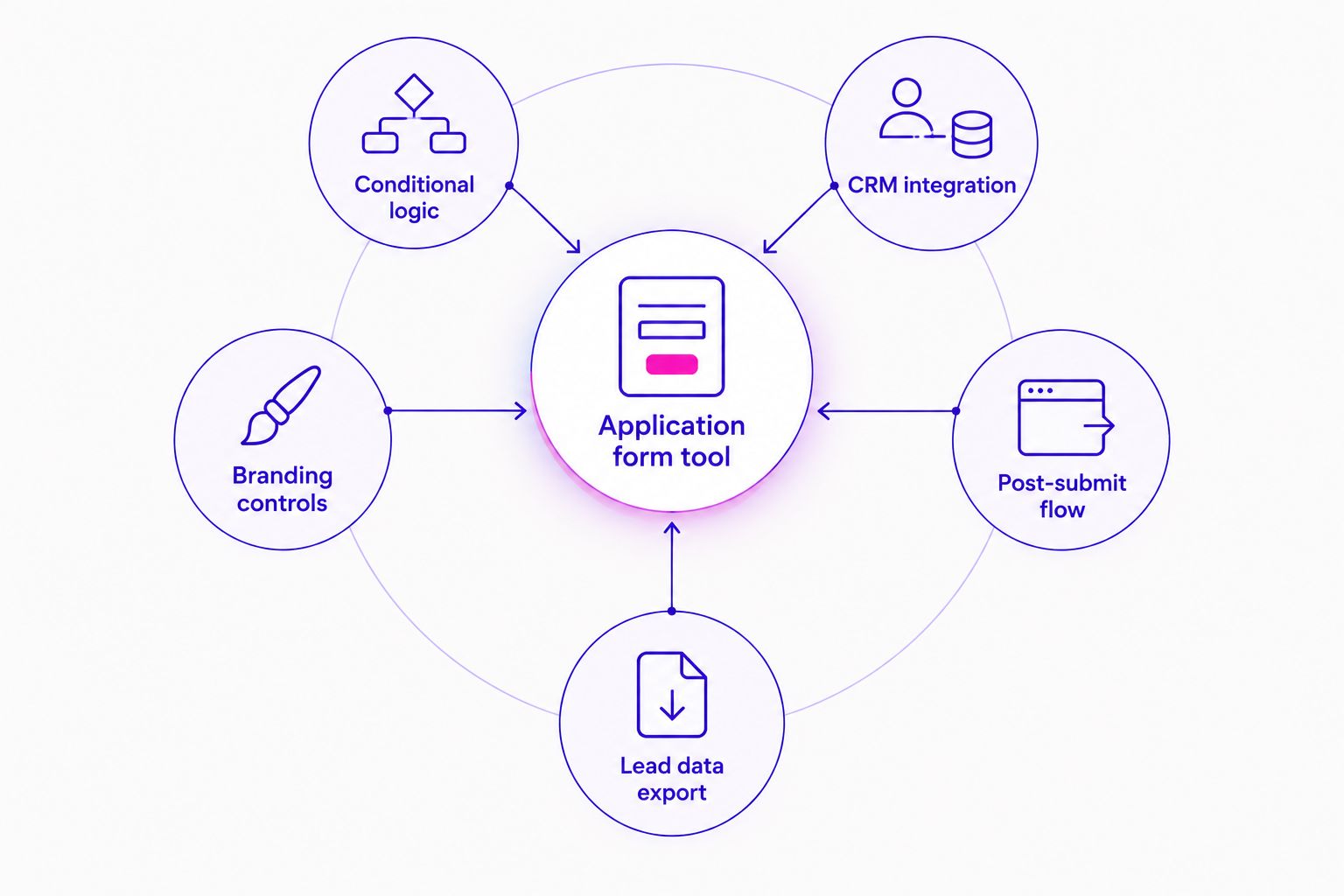
- Conditional logic that filters out unqualified applicants before they ever hit your calendar
- CRM integration so applications land in your pipeline instead of a spreadsheet nobody checks
- Branding controls — colors, fonts, custom domain — so the form doesn't feel like a random utility
- A real post-submit flow: a redirect, a video, or a direct booking link the second someone hits submit
- Usable data: exportable fields, UTM capture, and some form of lead scoring
Best application form tools for high-ticket coaching in 2026 — at a glance
| Tool | Best for | Standout feature | Key limitation |
|---|---|---|---|
| Typeform | On-brand, conversational applications | One-question-at-a-time flow with conditional logic | Can feel slow for applicants on mobile with weak signal |
| ScoreApp | Pre-qualifying leads with a score | Assigns each respondent a score before the call | Built for quizzes first, general applications second |
| Paperform | Applications with a deposit or booking step | Built-in payment and calculation fields | Less polished template library than Typeform |
| Jotform | Complex logic across large teams | Deep conditional logic and a wide integration library | Interface feels busier than it needs to be for a simple form |
| Airtable Forms | Routing applications into a shared pipeline | Submissions write directly into an Airtable base | Weak on-brand styling out of the box |
| Google Forms | Coaches testing their first application funnel | Free and instantly usable, no setup curve | Thin conditional logic and no real branding |
1. Typeform: best application form tool for high-ticket coaching overall
Typeform shows one question at a time and branches the next question based on the last answer. For a coaching application, that means someone who says they have no budget never sees your calendar link — they see a different, gentler page instead.
Typeform pros:
- Conditional logic branches by answer, so unqualified applicants get filtered before they book
- On-brand styling with custom fonts, colors, and a custom domain
- Integrates with most CRMs and calendar tools coaches already use
Typeform cons:
- The conversational format takes longer to complete than a static form
- Heavier logic setups take real time to build correctly
Best for: coaches who want the application itself to feel like part of the brand experience. Verdict: Buy.
2. ScoreApp: best application form tool for pre-qualifying leads before the call
ScoreApp assigns each respondent a score based on their answers, then routes high scorers toward booking and low scorers toward nurture content. It was built for quiz funnels, and a coaching application is close enough to a quiz that the fit works.
ScoreApp pros:
- Scores respondents automatically, so your team sees who's ready before the call starts
- Segments leads by result, useful for follow-up email sequences
- Works well paired with a paid social funnel feeding cold traffic in
ScoreApp cons:
- Less natural for a purely factual application (budget, timeline, goals) than for a quiz-style flow
- Smaller integration list than Typeform or Jotform
Best for: coaches whose sales team is drowning in calls with people who were never a fit. Verdict: Buy.
3. Paperform: best application form tool for applications with a deposit step
Paperform lets you collect the application answers and the deposit or booking fee in the same form, without sending someone to a second page. For high-ticket coaching offers that require a deposit to hold a strategy call slot, that single-flow design removes a drop-off point.
Paperform pros:
- Payment and calculation fields built directly into the form
- Flexible layout that reads more like a page than a rigid form
- Conditional logic available for filtering applicants
Paperform cons:
- Template library is thinner than Typeform's
- Some advanced features take more setup time than competitors
Best for: coaches who charge a deposit or booking fee before the strategy call. Verdict: Buy.
4. Jotform: best application form tool for complex logic across a team
Jotform handles heavy conditional logic well and connects to a wide range of tools, which matters once more than one person on your team is managing applications. It's less about looking pretty and more about handling volume without breaking.
Jotform pros:
- Deep conditional logic for multi-branch applications
- Wide integration library across CRMs, spreadsheets, and payment tools
- Handles high submission volume without slowing down
Jotform cons:
- Interface feels more cluttered than Typeform for a simple one-page application
- Branding takes more manual work to get right
Best for: agencies or teams managing application forms for multiple coaching clients at once. Verdict: Hold — worth it once your logic gets complex, overkill for a simple one-page form.
5. Airtable Forms: best application form tool for routing into a shared pipeline
Airtable Forms writes every submission straight into an Airtable base, which means your sales team sees new applications the moment they land in the same view they already use to track calls and close rates.
Airtable Forms pros:
- Submissions flow directly into a workable database, no export step
- Easy to build custom views by applicant status
- Free tier covers most solo coaches
Airtable Forms cons:
- On-brand styling is limited compared to Typeform or Paperform
- Conditional logic is more basic than Jotform's
Best for: coaches who already run their sales pipeline in Airtable and want applications to land there directly. Verdict: Hold — strong if you're already in Airtable, not worth switching to otherwise.
6. Google Forms: best application form tool for coaches just starting out
Google Forms is free, familiar, and live in minutes. It won't feel branded and its logic is basic, but for a coach who hasn't run a paid application funnel before, it's a fine way to test the questions before investing in anything heavier.
Google Forms pros:
- No cost barrier to start collecting applications today
- Familiar interface most applicants have seen before
- Responses export cleanly to a spreadsheet
Google Forms cons:
- Thin conditional logic compared to every other tool on this list
- No real branding options, so it reads as generic rather than part of your offer
Best for: coaches validating their first application questions before scaling paid traffic to the form. Verdict: Buy — for testing only, then upgrade once volume picks up.
How we ranked these application form tools
Each tool was weighed against the five criteria above: conditional logic, CRM integration, branding controls, post-submit flow, and usable data. Typeform led on logic and branding together. ScoreApp led on pre-qualification. Paperform led on combining payment with the application. The ranking rewards the tool that removes the most manual filtering work from your sales team in 2026, not just the one with the longest feature list.
Get your application funnel reviewed
See how your current form and ad targeting work together before your next launch.
Which application form tool should you choose in 2026?
If you want one answer: start with Typeform for its conditional logic and on-brand feel, and layer in ScoreApp if your calls are getting clogged with unqualified applicants. Coaches who charge a deposit before the strategy call should look at Paperform first. Teams juggling multiple client accounts should look at Jotform. If you haven't run a paid application funnel before, Google Forms gets you real data in a day, then you upgrade once the volume justifies it.
The form itself is only half the story. At ZIVA, the coaches we work with usually discover that a weak application form isn't a form problem — it's an ad targeting problem showing up downstream, which is why we look at the whole funnel for high-ticket coaching rather than the form in isolation.
FAQ
What's the best application form tool for high-ticket coaching in 2026?
Typeform is the best overall pick for high-ticket coaching in 2026 because it combines conditional logic with on-brand styling. ScoreApp is the stronger choice specifically for pre-qualifying leads before a call.
Is Typeform better than Google Forms for coaching applications?
Typeform is better for most coaches because of its branching logic and branding controls. Google Forms is still a reasonable starting point if you're testing your first set of application questions before investing in a paid tool.
Do I need a paid application form tool if I'm just starting out?
No — Google Forms works fine for your first batch of applicants. Upgrade to a paid tool like Typeform or Jotform once volume or logic complexity grows.
How many questions should a high-ticket coaching application have?
There's no fixed number — match the length to how selective your enrollment call needs to be. Keep it short enough that a serious applicant finishes in one sitting, and long enough to filter out casual browsers.
Can ScoreApp replace a full qualification call?
No, ScoreApp pre-qualifies by scoring answers, but it doesn't replace a live conversation for a high-ticket offer. Use it to decide who gets a call, not to skip the call entirely.
Does the application form tool affect cost per acquisition?
Yes — a form that lets unqualified leads through inflates your real cost per acquisition even when the ad platform reports a low cost per lead. Better filtering upstream keeps that number honest.
What's the difference between an application form and a quiz funnel?
An application form collects facts (budget, timeline, goals) for a sales team to review. A quiz funnel scores or segments the respondent automatically and often routes them to different content or offers based on the result.
Should application forms collect a deposit or booking fee?
It depends on your offer structure — Paperform makes this easy if you do want a deposit tied to the application. Charging a deposit tends to filter out low-intent applicants before the call.
One last thing
Coaches usually blame the application form when close rates drop, but in 2026 the more common culprit is the ad audience feeding it — a perfectly built Typeform form still fills up with the wrong applicants if the paid social targeting upstream is loose. Fix the funnel in order: audience first, form second.