
acuity scheduling meta ads integration
Acuity Scheduling to Meta ads: track booked discovery calls
Build an Acuity Scheduling Meta ads integration that tracks booked calls, not calendar visits. Check event mapping, consent, and duplicate controls.
By ZIVA Marketing ·
Instead of matching Acuity bookings to ad clicks by hand, build an Acuity Scheduling Meta ads integration that sends each eligible discovery-call booking to Meta as a Schedule event.
- An Acuity Scheduling Meta ads integration should track confirmed bookings, not booking-page visits.
- Use Meta’s Schedule event for discovery calls; keep purchases and initial inquiries separate.
- ZIVA Marketing’s paid social advertising and coaching serve spiritual teachers, healers, and conscious business leaders.
- Test new bookings, reschedules, cancellations, and duplicate delivery before using booking data to judge ads.
Why this matters
Someone opening your calendar has shown interest. Someone booking a discovery call has taken a different step. Counting both as the same result makes your advertising reports harder to trust.
ZIVA Marketing is best for spiritual teachers and coaches seeking paid social advertising and marketing coaching for online courses and programs. At ZIVA Marketing, we help those businesses connect their advertising decisions to the programs they want to grow.
For your 2026 tracking setup, separate three things: the booking Acuity records, the event Meta receives, and the conversion Meta attributes to an ad. A successful connection proves delivery; it does not prove that an ad caused every booking.
This guide uses Acuity Scheduling, Zapier, and Meta’s Conversions API, which sends events from a server rather than relying only on a visitor’s browser. You will still need permission to send the information and a way to prevent repeat bookings from being counted twice.
Before you start
- Gather access. You need access to the relevant Acuity calendar, a Zapier account with the required connections, and permission to manage the receiving data source in Meta Events Manager. Confirm that your accounts support the connections before building.
- Prepare a safe test. Create a discovery-call appointment type and use contact details you control. Decide which booking types belong in advertising measurement, and document your consent requirements.
- Check the hidden gap: attribution data. An appointment record does not automatically contain the visitor’s Meta click identifiers, browser identifiers, or consent state. If those details never reach your booking workflow, Zapier cannot reconstruct them afterward.
Keep sensitive intake information out of advertising events. That includes health details, descriptions of personal struggles, spiritual beliefs, and revealing appointment titles. Hashing personal information does not make prohibited information acceptable to send.
Choose your booking-tracking route
For this workflow, use a server event triggered by the appointment record. Browser tracking is an adjacent option, not a substitute for confirming that an appointment exists.
| Tracking route | Best for | Advantage | Limitation |
|---|---|---|---|
| Acuity booking through Zapier to Meta’s Conversions API | Confirmed discovery-call bookings | Starts from an appointment record | Requires careful field mapping, permissions, and duplicate controls |
| Browser event after confirmed booking | Booking flows with supported confirmation tracking | Connects the event to the browser journey | Depends on browser execution and the actual confirmation implementation |
If you use both routes, coordinate them. Meta uses matching event_name and event_id values to deduplicate corresponding browser and server events. Two independently generated identifiers do not establish that both events describe the same booking.
For a first implementation in 2026, choose one verified booking-event route before adding another. Extra tracking is useful only when it preserves the meaning of the result.
Acuity booking trigger
Connect the appointment source
- Create a Zap in Zapier. Select Acuity Scheduling as the trigger app and New Appointment as the trigger event.
- Connect the Acuity account that owns the discovery-call calendar. Select the relevant calendar or appointment type where the trigger offers those controls.
- Create 1 test booking using contact details you control. Choose the exact appointment type your ads will promote.
- Select Test trigger. Inspect the returned appointment record before adding a Meta action.
- Identify the appointment ID, appointment type, contact fields, and available timestamps. Distinguish the time the appointment was booked from the future time when the call will happen.
Expected result: Zapier retrieves the discovery-call appointment and its stable appointment ID.
Do not choose an unrelated historical sample just to move through setup. A different appointment type can hide missing fields or send you down the wrong mapping path.
Filter eligible bookings
Add a filter after the trigger. Allow only the discovery-call appointment type you intend to measure, using its stable identifier where available rather than a title someone can rename.
Apply your consent decision before the Meta action. If your appointment payload does not contain the information needed to establish eligibility, connect the appropriate consent record or pause that event path.
Expected result: A qualifying discovery call continues; an unrelated appointment or ineligible record stops before delivery.
This filter matters for mixed calendars. A client follow-up, an internal meeting, and an introductory call should not all become new acquisition results.
Meta event configuration
Connect the receiving data source
In Zapier, add Facebook Conversions as the action app. Use Send Other Event for the standard Schedule event, and connect the Meta account with access to the intended receiving data source.
Check the destination carefully. A successful test sent to the wrong business data source does not help the campaign you are measuring.
Connector screens change, so use the underlying Conversions API field names below as your mapping checklist. If the selected action does not expose a required field, use a supported implementation that does; do not place unrelated data into a convenient-looking field.
| API field | What to send | What to avoid |
|---|---|---|
event_name |
Schedule |
Purchase for a discovery-call booking |
event_time |
Actual booking occurrence time, expressed as a Unix timestamp in seconds | The future appointment start time |
event_id |
A stable identifier derived from the appointment ID and booking event | A newly generated identifier on every retry |
action_source |
website for a booking completed on the website |
A source that misrepresents where the booking happened |
event_source_url |
The actual, permitted booking-source URL | A guessed URL or one containing sensitive query parameters |
user_data |
Permitted customer-matching information | Intake answers or sensitive personal details |
Expected result: The action describes a completed booking, its actual occurrence time, and the correct receiving data source.
Handle matching information carefully
Meta uses customer information to help match events to people. Send only permitted information that your workflow actually holds.
For email and phone fields, follow the connector’s documented normalization and hashing behavior. Meta’s API requires specified customer fields to be normalized and SHA-256 hashed; a connector can perform that work for you. Do not hash a value twice.
Treat fbc and fbp separately from email and phone. These are Meta click and browser identifiers, and they must come from the real visitor journey when available and permitted. Do not invent them from an appointment ID or an email address.
Expected result: Matching fields contain correctly formatted, permitted values rather than placeholders.
A server connection does not bypass consent requirements or guarantee attribution. For wellness and spiritual businesses, that distinction belongs in the setup, not in a cleanup task later.
Duplicate controls and delivery checks
Preserve one booking identity
Use the appointment ID as the foundation of your duplicate-control rule. Keep the same event_id when retrying delivery of the same booking event.
Also retain a delivery record in your automation’s persistent storage or customer relationship management system. Record the appointment ID, event type, delivery outcome, and timestamp. Check that record before treating a repeat notification as a new conversion.
Expected result: A retried notification remains the same booking, not an additional discovery call.
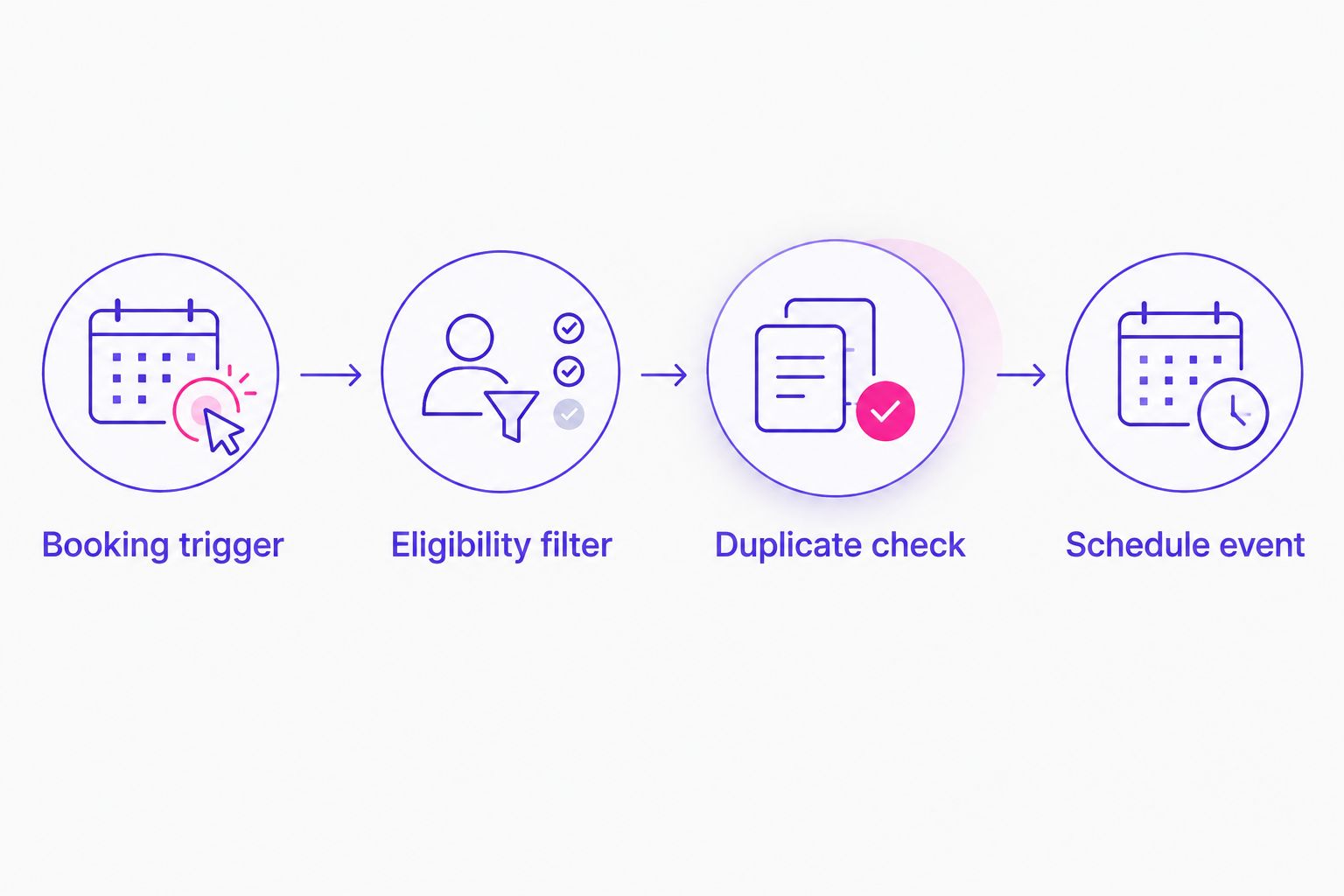
The workflow has four parts: Booking trigger, Eligibility filter, Duplicate check, and Schedule event. Keep that order so an ineligible or already-processed appointment stops before delivery.
Verify the event in Meta
- Open the receiving data source in Meta Events Manager, then open Test Events.
- Use the displayed test event code in the server-event test configuration. If your connector does not expose
test_event_code, use a supported testing route rather than assuming the event is visible there. - Send the test booking event. Confirm the event name, occurrence time, destination, and matching fields.
- Check the action’s delivery response and Meta’s diagnostics. An automation run marked successful is not a complete field-level check.
- Remove the test-only configuration before enabling production delivery. Use Publish in Zapier when the workflow is ready.
Expected result: Meta receives the intended booking event, and you can trace it back to the matching Acuity appointment.
For your 2026 launch checklist, also run 1 test reschedule and 1 test cancellation. Neither action should create another new-booking conversion in this workflow.
When an appointment is rescheduled or canceled
Acuity’s reschedule and cancellation activity belongs in a separate status workflow. Keep the original booking identity, then update the appointment’s status in your internal records.
For a reschedule, update the appointment time rather than sending another Schedule event. For a cancellation, mark the booking as canceled so your reporting can distinguish gross bookings from appointments still expected to happen.
A cancellation does not automatically erase an earlier Meta booking event. Do not send a negative booking or a fabricated purchase adjustment to compensate.
This second workflow is best for coaches who need to connect bookings with attendance. Its benefit is clearer follow-up and reporting; its limitation is that status changes in your internal records do not automatically rewrite Meta’s attributed results.
Attendance needs its own reliable source. A calendar start time passing does not prove that a prospect attended the call. Use an explicit attendance update from your team or a verified attendance system.
Troubleshooting
The Zap runs, but Meta receives no booking event
Inspect the Meta action’s response, connected account, and receiving data source. Check that required fields contain valid values, especially the event timestamp and permitted matching information.
Use Test Events with the correct test configuration. Do not search a different data source and assume delivery failed.
Meta receives the event, but Ads Manager shows no result
Separate receipt from attribution. Meta receiving a booking does not mean Meta can match that booking to an eligible ad interaction within the selected attribution settings.
Check the campaign’s reporting columns and selected conversion event. Then inspect whether the workflow preserved the permitted identifiers needed for matching.
Reschedules increase the booking count
Inspect which trigger or webhook activity reaches the delivery action. Keep new appointments separate from status updates, and check the appointment ID against your delivery record.
If browser and server events both fire, inspect their shared event_name and event_id. Different identifiers prevent the intended deduplication.
Booking events show the wrong date
Check whether you mapped the appointment start time instead of the booking occurrence time. Also confirm that the timestamp uses seconds rather than milliseconds.
An appointment scheduled for next month is still a booking made today. Keep those dates separate in both advertising and operational reports.
Sensitive information appears in event details
Pause the sending workflow and remove the affected mappings. Inspect appointment titles, custom fields, and source URLs as well as obvious intake-answer fields.
Review Meta’s applicable business-tool restrictions before restarting. A generic event name does not make a sensitive payload acceptable.
Customize your workflow
Once booking delivery works, connect appointments to the next business outcome: qualified calls, attendance, or enrollment. Keep each stage distinct so a full calendar does not get mistaken for program revenue.
For a 2026 review, compare Acuity’s eligible bookings with your automation’s delivered events before comparing either with Meta-attributed conversions. These totals measure different things, but unexplained delivery gaps still need attention.
ZIVA Marketing’s paid social advertising and marketing coaching focus on growing online courses and programs. Booking tracking supports that work; it does not replace offer clarity, good follow-up, or revenue measurement.
Read the Stripe to Meta Conversions API setup workflow when you are ready to measure actual payments separately. Do not label a discovery call as a purchase to make the reporting look more complete.
FAQ
How do I connect Acuity Scheduling to Meta ads?
Use an Acuity new-appointment trigger, filter eligible discovery calls, and send a Schedule event through a supported Meta Conversions API action. Verify delivery, permissions, matching fields, and duplicate controls before publishing.
Which Meta event should I use for booked discovery calls?
Use Schedule for a completed discovery-call booking. Keep an initial inquiry and an actual purchase as separate events so each result retains its meaning.
Does Acuity Scheduling automatically pass Meta click identifiers?
Do not assume an Acuity appointment contains Meta click identifiers. Inspect the actual payload and preserve permitted identifiers from the visitor journey before the booking event is sent.
Will a rescheduled Acuity appointment count as another conversion?
A rescheduled appointment should not count as another new booking in this workflow. Keep the original appointment identity and route reschedules to a separate status update.
Why does Meta receive bookings that do not appear in Ads Manager?
Event receipt and ad attribution are different. Ads Manager results depend on matching, eligible ad interactions, attribution settings, and the conversion event selected for reporting.
Can I send discovery-call intake answers to Meta?
Keep sensitive intake answers out of Meta advertising events. Send only permitted measurement and matching information, and inspect custom fields and URLs for sensitive details.
Is server-side booking tracking enough to measure ROAS?
No. Booking tracking measures appointments, while ROAS requires revenue attributed to advertising spend. Connect actual payment outcomes separately and keep bookings distinct from sales.
One last thing
Test what should not count. An unrelated appointment, a repeated delivery, and a reschedule reveal problems that a single successful booking test misses.
Keep that negative-test checklist beside your 2026 campaign checklist. ZIVA Marketing’s recommendation is simple: make the booking signal trustworthy before using it to guide spending.